
PhonebookServer Руководство пользователя

Введение

Обзор

PhonebookServer — это настольное приложение для Windows, разработанное нашей компанией для управления и распространения телефонных книг на наши VoIP-устройства. Его можно легко использовать с простой настройкой. Он также может функционировать как модуль в платформе управления FDMS.

Целевая аудитория

Этот документ предназначен для персонала, которому необходимо распространять телефонные книги на наши VoIP-устройства.

Установка PhonebookServer

Извлеките сжатый пакет PhonebookServer на локальный компьютер, откройте папку PhonebookServer и запустите PhonebookServer.exe напрямую, чтобы запустить приложение, как показано на Рисунке 1:
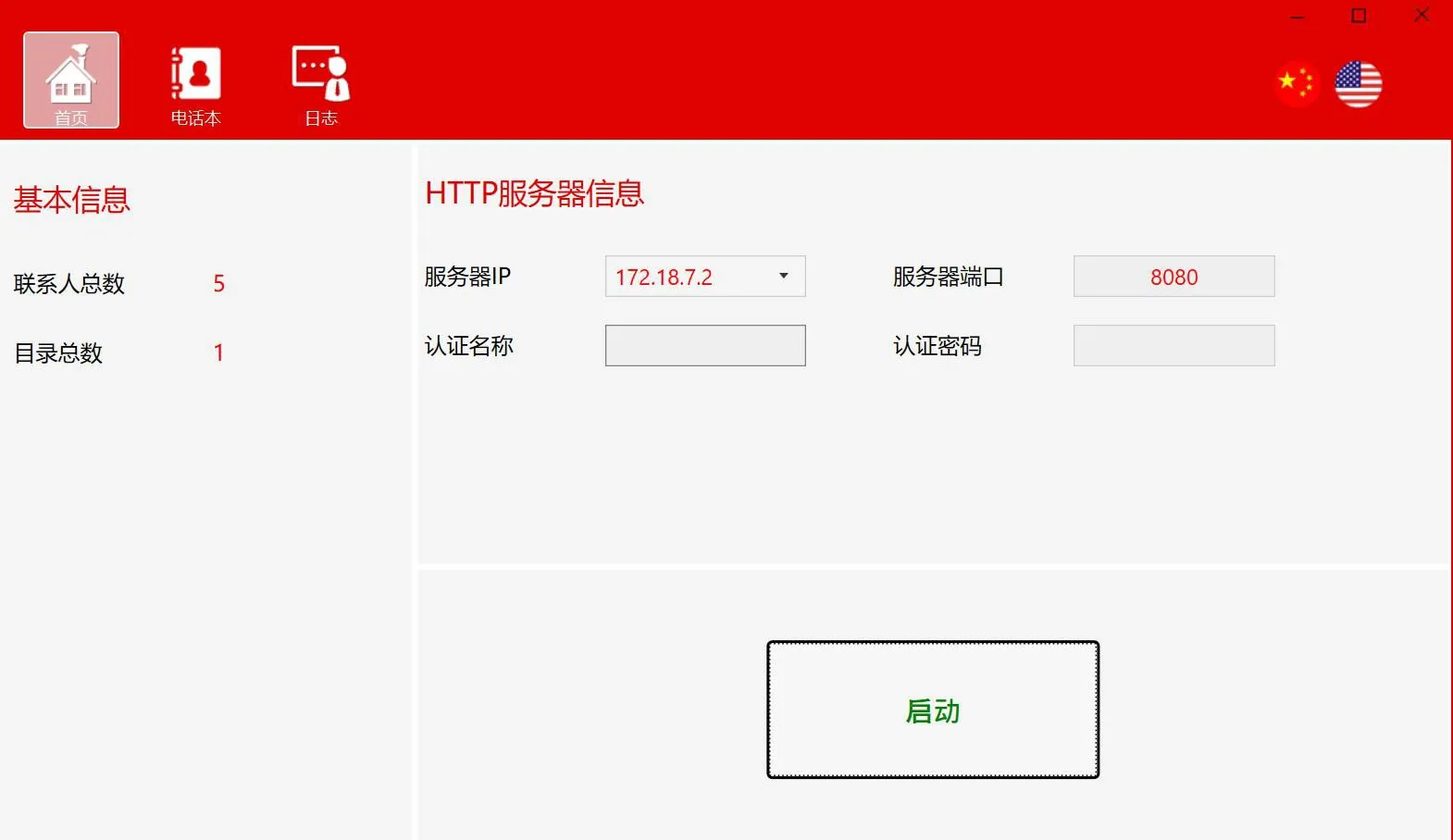
Извлечь и открыть PhonebookServer
                                                                                                                                Рисунок 1

Использование PhonebookServer

Перед использованием откройте программное обеспечение PhonebookServer, настройте параметры HTTP-сервера и запустите сервер.

Домашняя страница

Основная информация: общее количество контактов и общее количество каталогов
Информация HTTP-сервера: IP-адрес и порт сервера, имя пользователя и пароль для аутентификации
Кнопка запуска: используется для запуска или остановки сервера
Настройка информации HTTP-сервера
1. Установите IP-адрес сервера
Поле IP-адреса сервера отображает список сетевых адаптеров ПК, и вы можете выбрать нужный IP-адрес из раскрывающегося списка.
Примечание: Не используйте 127.0.0.1 в качестве IP-адреса запуска сервера.
2. Установите порт сервера
Вы можете использовать порт по умолчанию 8080 или установить другой доступный порт, который еще не используется.
3. Установите имя пользователя и пароль для аутентификации
Запуск сервера
Нажмите кнопку Пуск на домашней странице. После запуска сервера будет отображен адрес сервера телефонной книги, и его можно будет скопировать одним щелчком мыши.
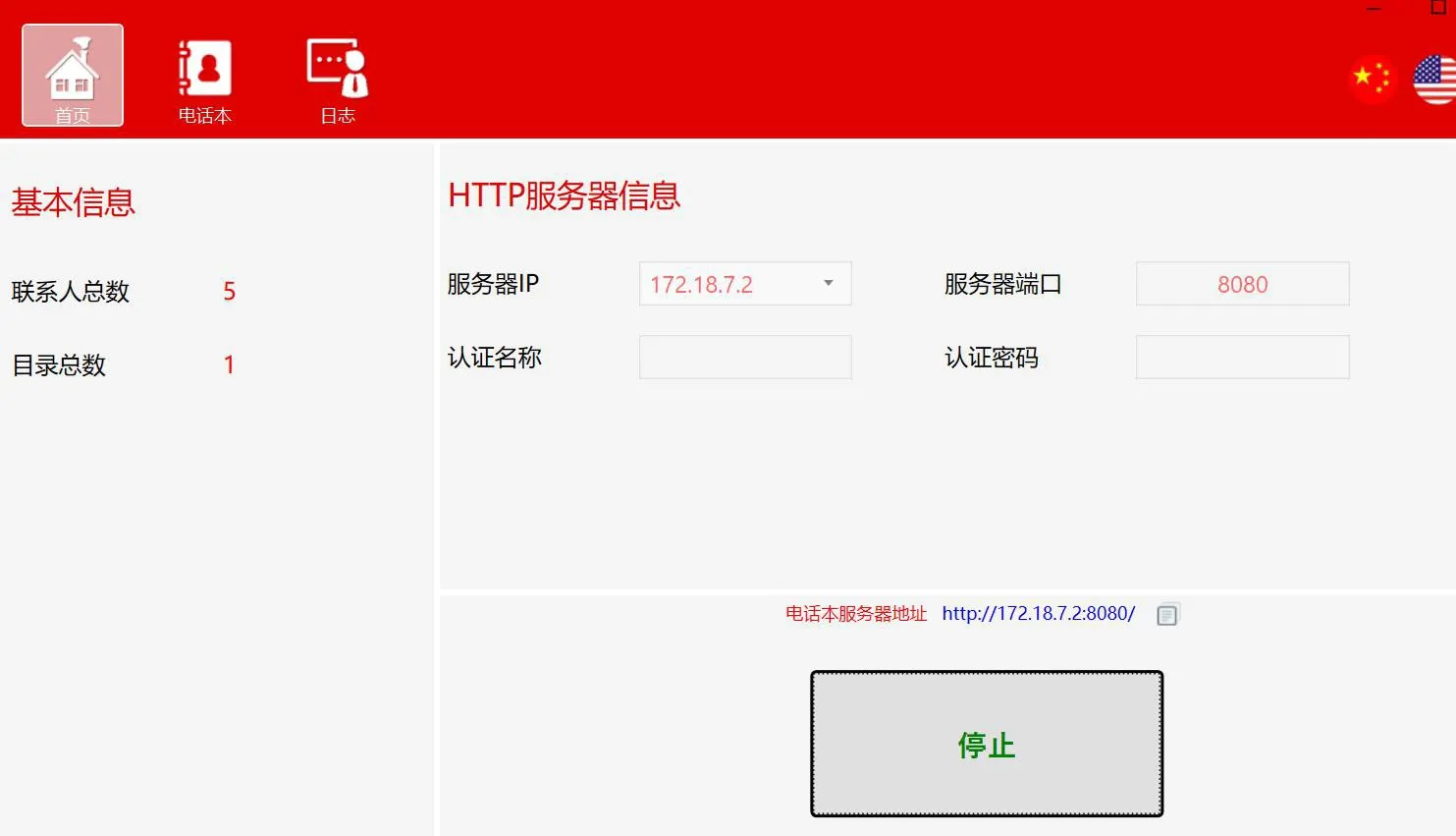
Запуск сервера

Телефонная книга

Этот раздел в основном используется для управления каталогами и контактами.
Операции с каталогами
Добавить каталог:

1. Нажмите кнопку Добавить
2. Щелкните правой кнопкой мыши по пустой области на панели каталогов и выберите Добавить
Добавить подкаталог (поддерживается несколько уровней):
1. Выберите каталог, в который вы хотите добавить подкаталог, затем нажмите кнопку Добавить
2. Выберите каталог, в который вы хотите добавить подкаталог, щелкните его правой кнопкой мыши и выберите Добавить
Удалить каталог:
1. Выберите каталог или подкаталог, который хотите удалить, затем нажмите кнопку Удалить
2. Выберите каталог или подкаталог, который хотите удалить, щелкните его правой кнопкой мыши и выберите Удалить
Редактировать имя каталога:
1. Выберите каталог или подкаталог, который хотите отредактировать, затем нажмите кнопку Редактировать
2. Выберите каталог или подкаталог, который хотите отредактировать, щелкните его правой кнопкой мыши и выберите Редактировать
Экспорт каталога:
Выберите каталог для экспорта, нажмите кнопку Экспорт или щелкните правой кнопкой мыши и выберите Экспорт, установите адрес сервера телефонной книги (или выберите предварительно настроенный адрес сервера телефонной книги), затем выберите путь экспорта и сохраните файл.
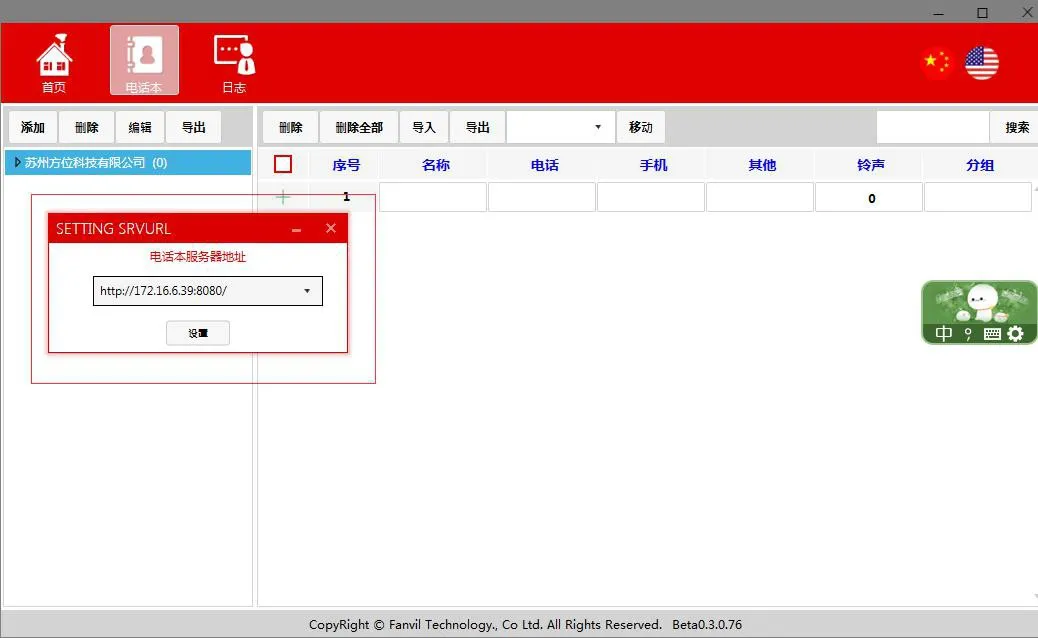
Экспорт каталога телефонной книги
 Контакты
Добавить контакт:
Выберите каталог, в который вы хотите добавить контакт, отредактируйте информацию о контакте (имя и номер телефона обязательны), и после редактирования щелкните пустую область в поле редактирования нового контакта, чтобы сохранить его.
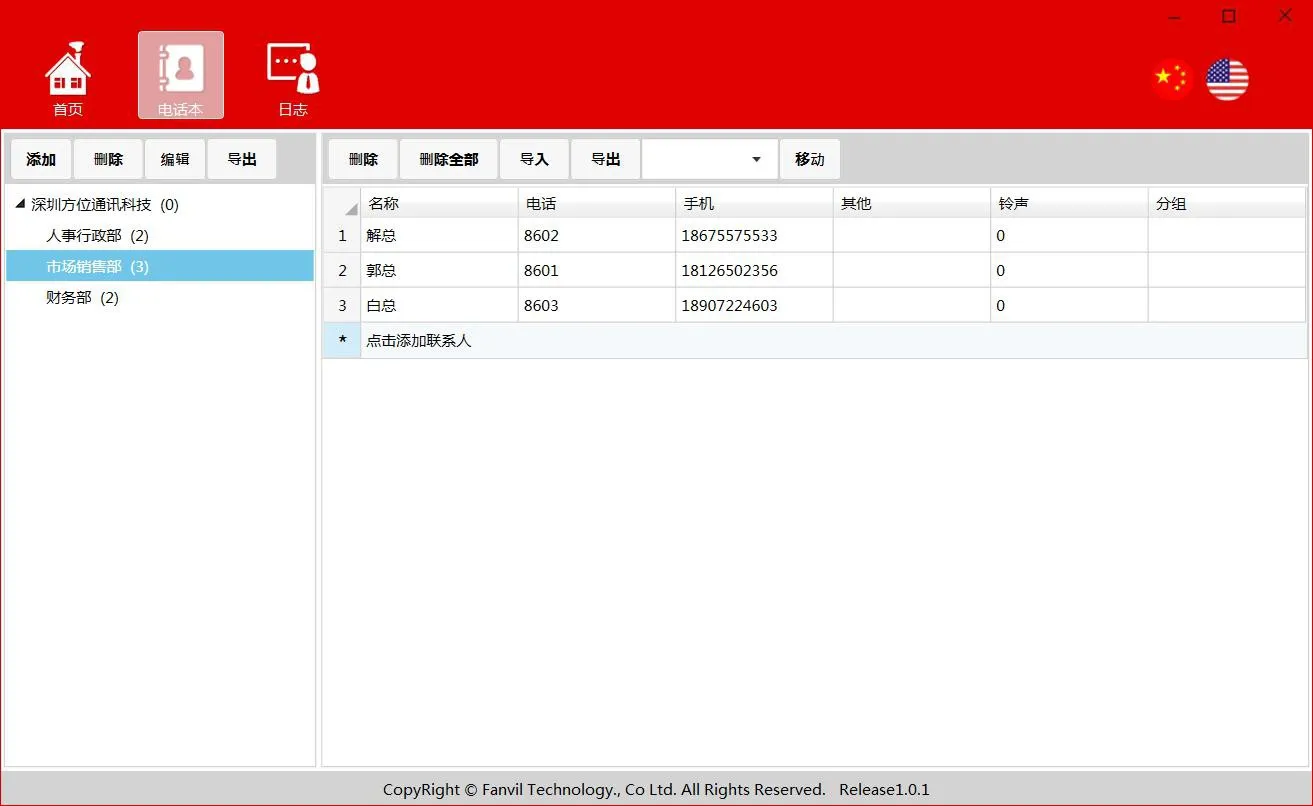
Добавить контакт
Удалить контакт:
Выберите контакт, который хотите удалить, затем нажмите кнопку Удалить
Удалить все контакты:
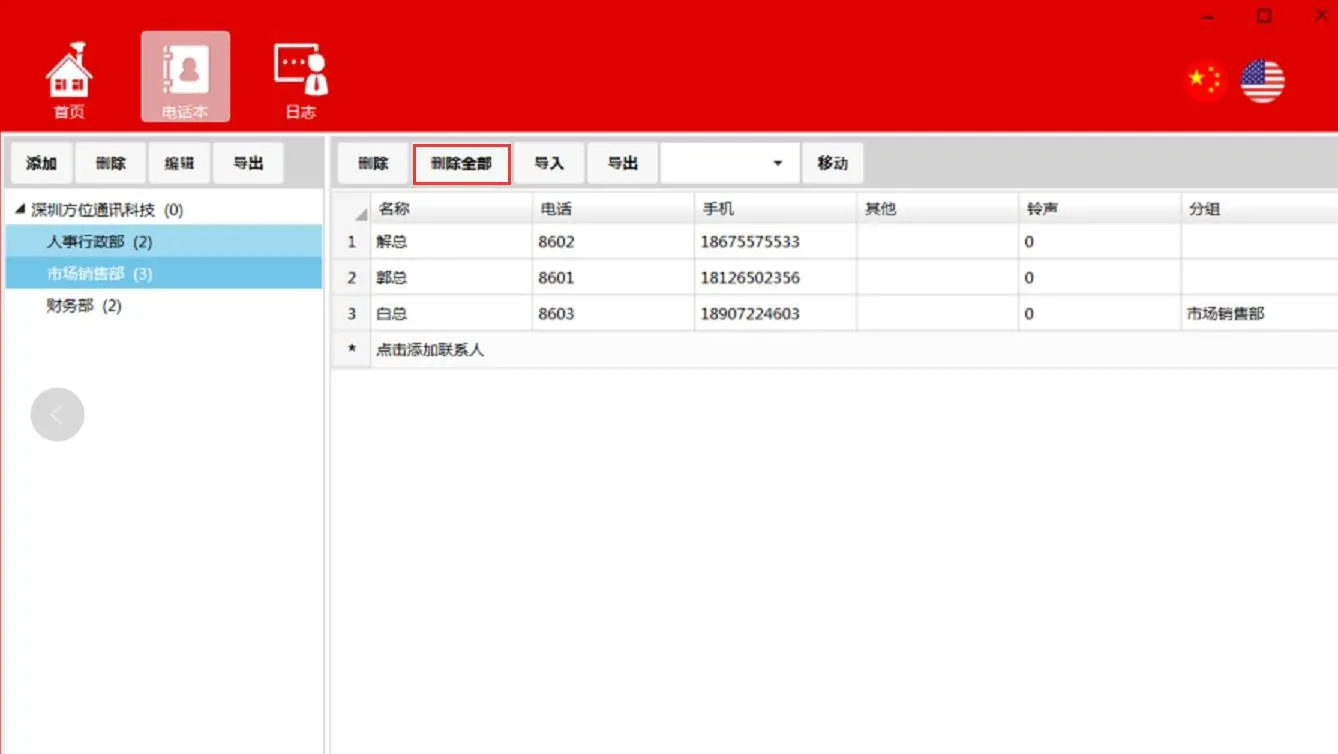
Удалить все контакты
Импорт контактов:
Выбрать каталог->Импорт->выберите файл для импорта. После успешного завершения импорта импортированные контакты будут отображаться в текущем каталоге.
Экспорт контактов:
Выбрать каталог->Экспорт->выберите целевой путь для экспорта
Перемещение контактов:
Выберите контакт для перемещения->Выбрать каталог->Переместить
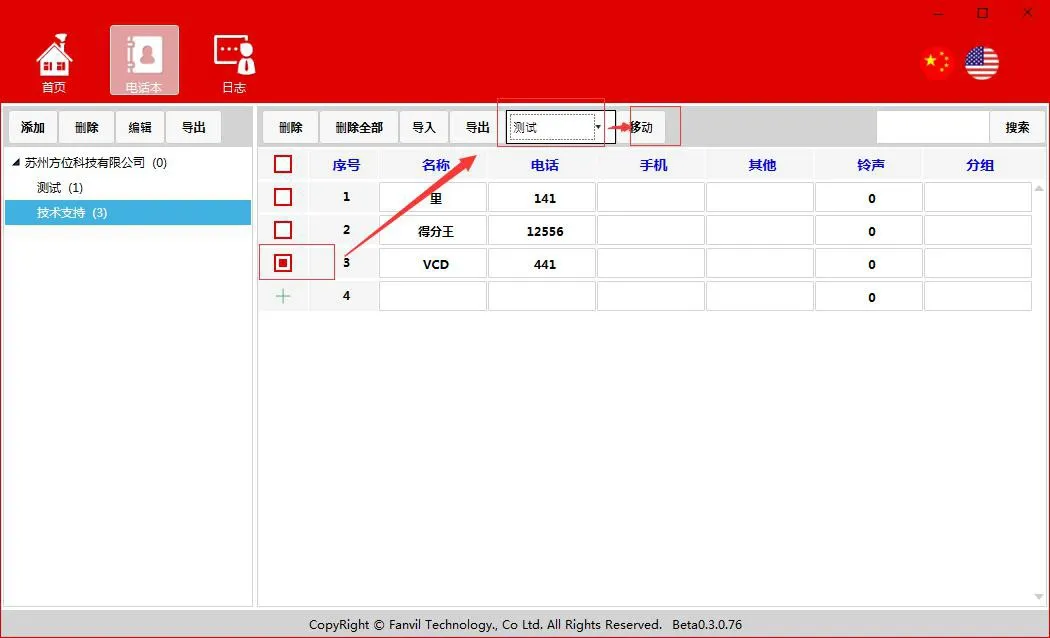
Перемещение контактов
Поиск контактов:
Поддерживает сопоставление по имени контакта, номеру телефона и другим полям
Журналы
Раздел журналов в основном записывает операции, связанные с каталогами, контактами, а также действия по запуску/остановке сервера.

Доступ к телефонной книге с телефона

Откройте веб-интерфейс телефона, затем перейдите в “Телефонная книга”-“Облачная телефонная книга”-“Управление облачной телефонной книгой”. Установите URL-адрес сервера телефонной книги, а имя пользователя и пароль установите в соответствии с учетными данными аутентификации, настроенными в PhonebookServer. После сохранения настроек телефон успешно получит доступ к серверу телефонной книги.
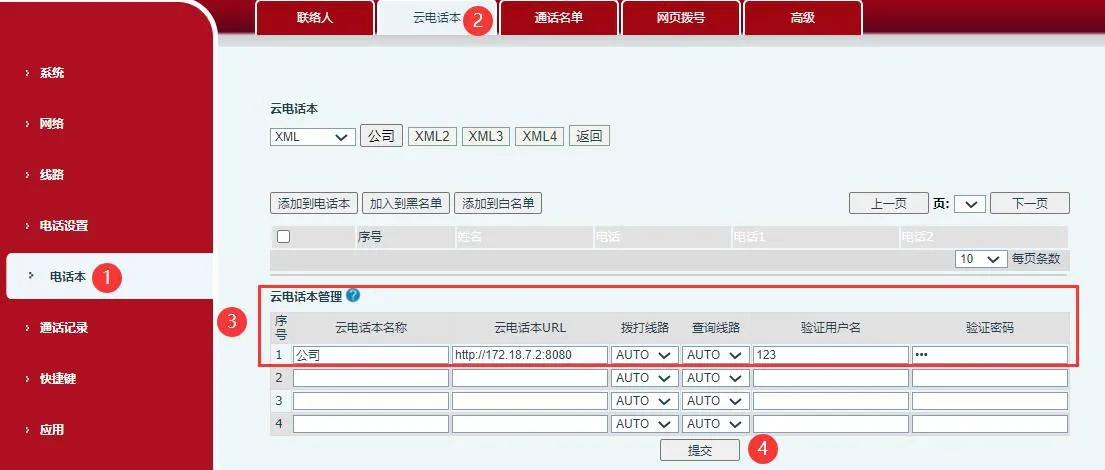

Настройки управления облачной телефонной книгой телефона

Каталог
обслуживание клиентов Телефон
We use cookie to improve your online experience. By continuing to browse this website, you agree to our use of cookie.

Cookies

This Cookie Policy explains how we use cookies and similar technologies when you access or use our website and related services. Please read this Policy together with our Terms and Conditions and Privacy Policy so that you understand how we collect, use, and protect information.

By continuing to access or use our Services, you acknowledge that cookies and similar technologies may be used as described in this Policy, subject to applicable law and your available choices.

Updates to This Cookie Policy

We may revise this Cookie Policy from time to time to reflect changes in legal requirements, technology, or our business practices. When we make updates, the revised version will be posted on this page and will become effective from the date of publication unless otherwise required by law.

Where required, we will provide additional notice or request your consent before applying material changes that affect your rights or choices.

What Are Cookies?

Cookies are small text files placed on your device when you visit a website or interact with certain online content. They help websites recognize your browser or device, remember your preferences, support essential functionality, and improve the overall user experience.

In this Cookie Policy, the term “cookies” also includes similar technologies such as pixels, tags, web beacons, and other tracking tools that perform comparable functions.

Why We Use Cookies

We use cookies to help our website function properly, remember user preferences, enhance website performance, understand how visitors interact with our pages, and support security, analytics, and marketing activities where permitted by law.

We use cookies to keep our website functional, secure, efficient, and more relevant to your browsing experience.

Categories of Cookies We Use

Strictly Necessary Cookies

These cookies are essential for the operation of the website and cannot be disabled in our systems where they are required to provide the service you request. They are typically set in response to actions such as setting privacy preferences, signing in, or submitting forms.

Without these cookies, certain parts of the website may not function correctly.

Functional Cookies

Functional cookies enable enhanced features and personalization, such as remembering your preferences, language settings, or previously selected options. These cookies may be set by us or by third-party providers whose services are integrated into our website.

If you disable these cookies, some services or features may not work as intended.

Performance and Analytics Cookies

These cookies help us understand how visitors use our website by collecting information such as traffic sources, page visits, navigation behavior, and general interaction patterns. In many cases, this information is aggregated and does not directly identify individual users.

We use this information to improve website performance, usability, and content relevance.

Targeting and Advertising Cookies

These cookies may be placed by our advertising or marketing partners to help deliver more relevant ads and measure the effectiveness of campaigns. They may use information about your browsing activity across different websites and services to build a profile of your interests.

These cookies generally do not store directly identifying personal information, but they may identify your browser or device.

First-Party and Third-Party Cookies

Some cookies are set directly by our website and are referred to as first-party cookies. Other cookies are set by third-party services, such as analytics providers, embedded content providers, or advertising partners, and are referred to as third-party cookies.

Third-party providers may use their own cookies in accordance with their own privacy and cookie policies.

Information Collected Through Cookies

Depending on the type of cookie used, the information collected may include browser type, device type, IP address, referring website, pages viewed, time spent on pages, clickstream behavior, and general usage patterns.

This information helps us maintain the website, improve performance, enhance security, and provide a better user experience.

Your Cookie Choices

You can control or disable cookies through your browser settings and, where available, through our cookie consent or preference management tools. Depending on your location, you may also have the right to accept or reject certain categories of cookies, especially those used for analytics, personalization, or advertising purposes.

Please note that blocking or deleting certain cookies may affect the availability, functionality, or performance of some parts of the website.

Restricting cookies may limit certain features and reduce the quality of your experience on the website.

Cookies in Mobile Applications

Where our mobile applications use cookie-like technologies, they are generally limited to those required for core functionality, security, and service delivery. Disabling these essential technologies may affect the normal operation of the application.

We do not use essential mobile application cookies to store unnecessary personal information.

How to Manage Cookies

Most web browsers allow you to manage cookies through browser settings. You can usually choose to block, delete, or receive alerts before cookies are stored. Because browser controls vary, please refer to your browser provider’s support documentation for details on how to manage cookie settings.

Contact Us

If you have any questions about this Cookie Policy or our use of cookies and similar technologies, please contact us at support@becke.cc .