
Функция завершения IP-телефонного звонка и руководство по конфигурации

Введение

Обзор

Завершение вызова — это функция, которая предлагает локальному телефону варианты повторного набора, ручного обратного вызова или отмены, когда вызываемый абонент занят или отклоняет вызов.

Применимые модели

Данный документ применим к моделям, включая BX3S и BX4. Серии BX5S и BX6 в настоящее время НЕ поддерживают функцию завершения вызова.

Целевая аудитория

Этот документ предназначен для внутренних тестировщиков компании, которым необходимо быстро понять и проверить функцию завершения вызова.

Описание функции завершения вызова

Когда функция завершения вызова включена с активированным автоматическим сигнальным повторным набором, телефон отобразит сообщения Call Completion Waiting xxx и Call Completion Calling xxx, если вызываемый абонент занят или отклоняет вызов (код отклонения: 486). Телефон отслеживает состояние свободности вызываемого абонента с помощью SIP-сигнализации (notify: terminated), позволяя пользователям вручную выполнить обратный вызов или отменить запрос.

Когда завершение вызова отключено, телефон НЕ будет отображать всплывающие окна Call Completion Waiting xxx и Call Completion Calling xxx.

Руководство по настройке завершения вызова

1. Завершение вызова находится в разделе файла конфигурации:

Примечание: Серии BX5S и BX6 не поддерживают функцию завершения вызова; файл конфигурации содержит параметр P1 Call Complete: 0.
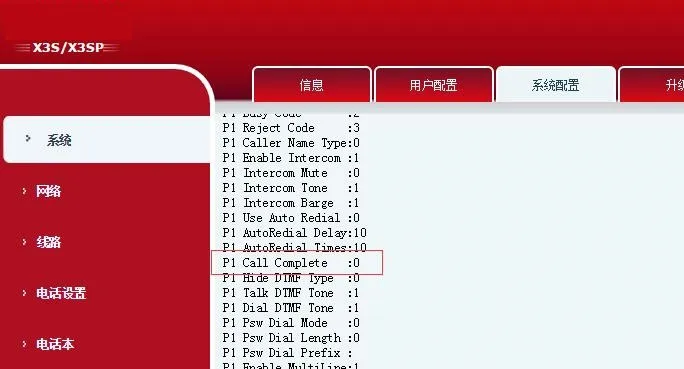
Call Completion Display in Configuration File Interface

Имя параметраОписание параметра
P1 Call CompleteВключает или отключает функцию Call Complete. Значение 1: Когда вызываемый абонент переходит из занятого состояния в свободное, телефон предлагает ручной обратный вызов или отмену. Значение 0: Отключает функцию. (По умолчанию: 0 для BX3/BX4; BX5/BX6 не поддерживают эту функцию)


2. Путь в веб-интерфейсе: Phone Settings - Features - General Settings. Установите или снимите флажок Call Completion, чтобы включить или отключить функцию.
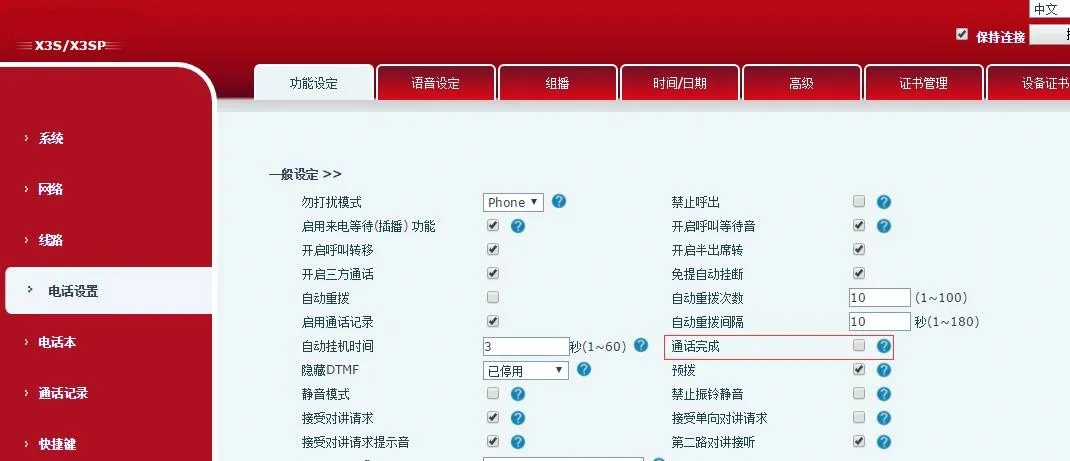
Call Completion Location in Web Interface

3. Путь в LCD-интерфейсе: Menu - Features - Call Completion
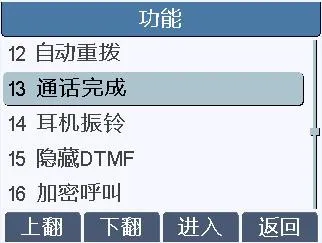
Call Completion Location in LCD Interface

Нажмите Enter для доступа к настройкам, затем выберите On или Off, чтобы включить или отключить функцию.
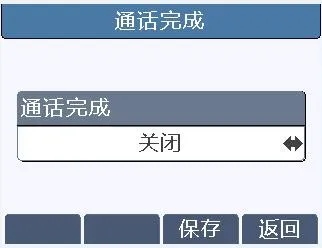
Enable or Disable Call Completion Settings

Руководство пользователя по завершению вызова

Вызываемый абонент занят (Ожидание вызова отключено)

1. Включите Call Completion на тестовом телефоне (через Web - Phone Settings - Features - General Settings или LCD - Menu - Features - Call Completion). Отключите Call Waiting на целевом телефоне B.

2. Телефон B разговаривает с телефоном C. Тестовый телефон звонит телефону B в режиме громкой связи, трубки или гарнитуры. Тестовый телефон отображает всплывающее окно Call Completion Waiting xxx (xxx = номер телефона B), как показано ниже:
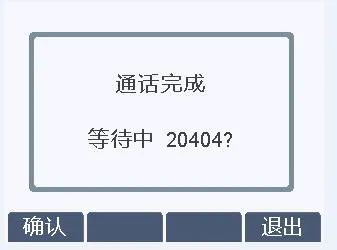
Phone displays 'Call Completion Waiting xxx' pop-up

3. Действия с всплывающим окном Call Completion Waiting xxx:

(1) Нажмите Cancel: Телефон выходит из экрана ожидания и возвращается в режим ожидания. Когда телефон B освободится, приглашение к обратному вызову не появится.

(2) Нажмите OK: Телефон выходит из экрана ожидания и возвращается в режим ожидания. Примерно через 30 секунд после того, как телефон B освободится, тестовый телефон отобразит всплывающее окно Call Completion Calling xxx:
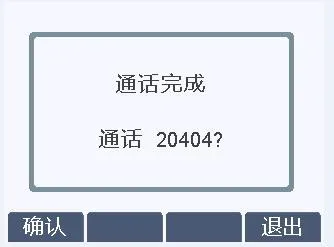
Call Completion Waiting pop-up

Нажмите Cancel: Вызов не производится, возврат в режим ожидания.

Нажмите OK: В захвате SIP-пакетов видно, что peer отправляет Notify (terminated). Тестовый телефон повторно наберет номер телефона B для установления обычного вызова.
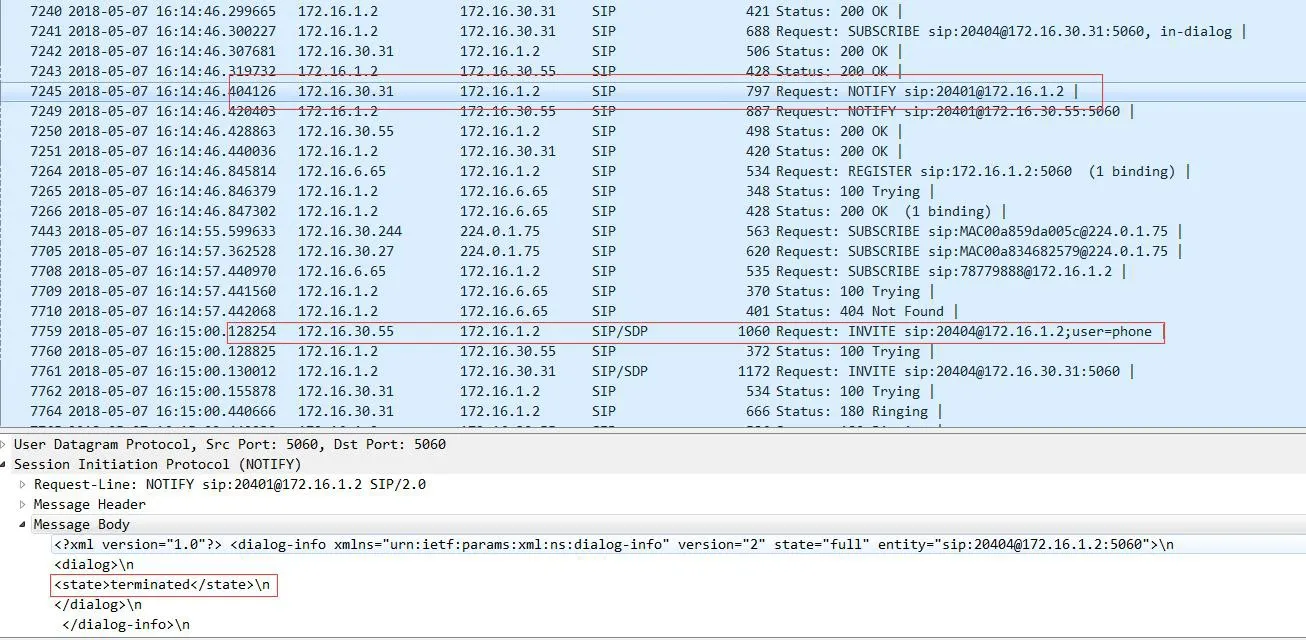
SIP Packet Capture Filter

Вызываемый абонент отклоняет вызов (Код отклонения: 486)

1. Включите Call Completion на тестовом телефоне. Установите код ответа на отклонение 486 (Busy Here) на целевом телефоне B.

2. Тестовый телефон звонит телефону B в режиме громкой связи, трубки или гарнитуры. Телефон B отклоняет вызов. Тестовый телефон отображает всплывающее окно Call Completion Waiting xxx (xxx = номер телефона B), как показано ниже:
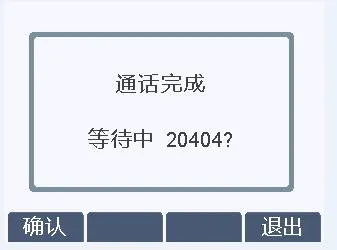
Call Completion Pop-up Interface

3. Действия с всплывающим окном Call Completion Waiting xxx:

(1) Нажмите Cancel: Телефон выходит из экрана ожидания и возвращается в режим ожидания. Когда телефон B освободится, приглашение к обратному вызову не появится.

(2) Нажмите OK: Применимы два сценария:

     a) Если телефон B был на активном вызове: После отклонения тестовый телефон возвращается в режим ожидания. Он покажет всплывающее окно Call Completion Calling xxx примерно через 30 секунд после того, как телефон B положит трубку.

     b) Если телефон B был свободен: После немедленного отклонения и возврата в режим ожидания тестовый телефон быстро отображает всплывающее окно Call Completion Calling xxx:
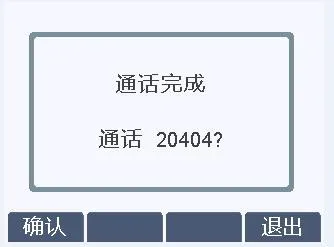
Call Completion Pop-up

Нажмите Cancel: Вызов не производится, возврат в режим ожидания.

Нажмите OK: В захвате SIP-пакетов видно, что peer отправляет Notify (terminated). Тестовый телефон повторно наберет номер телефона B для установления обычного вызова.
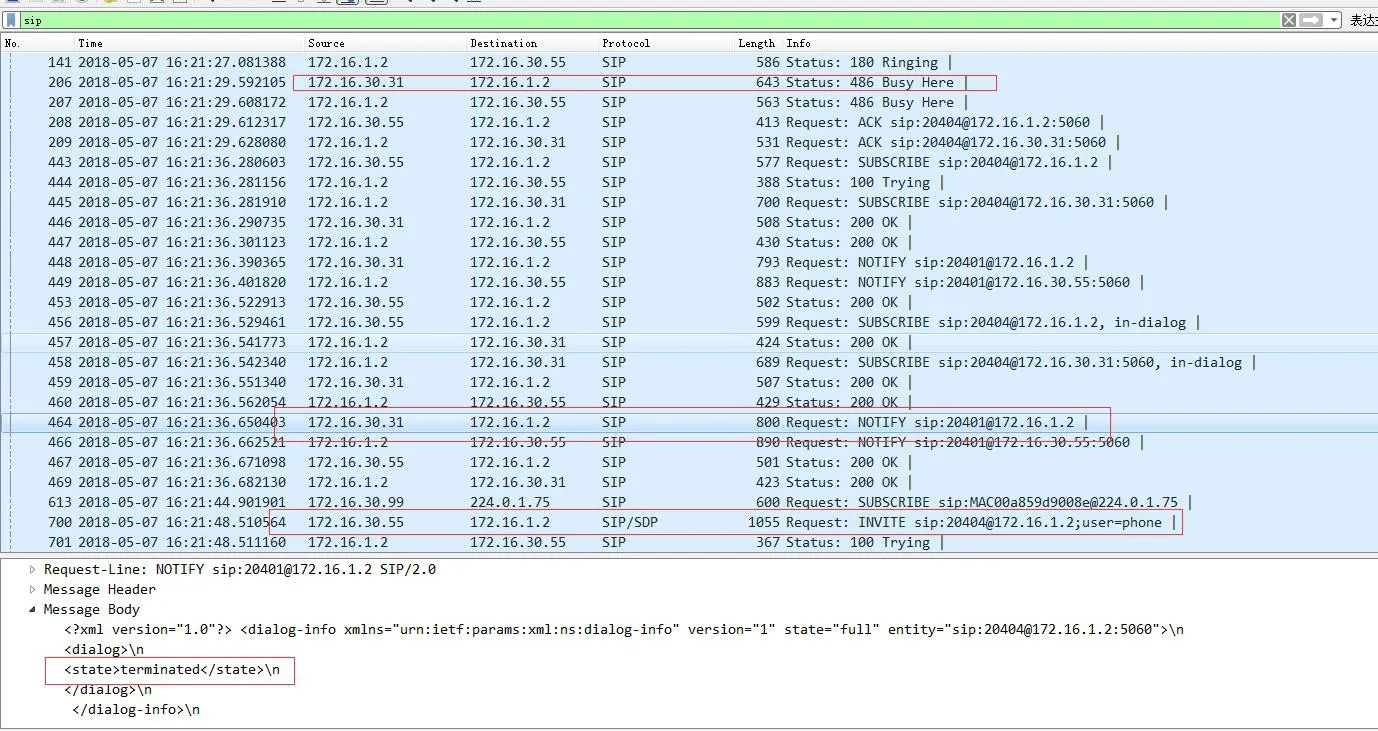

SIP Packet Capture Filter

Каталог
обслуживание клиентов Телефон
We use cookie to improve your online experience. By continuing to browse this website, you agree to our use of cookie.

Cookies

This Cookie Policy explains how we use cookies and similar technologies when you access or use our website and related services. Please read this Policy together with our Terms and Conditions and Privacy Policy so that you understand how we collect, use, and protect information.

By continuing to access or use our Services, you acknowledge that cookies and similar technologies may be used as described in this Policy, subject to applicable law and your available choices.

Updates to This Cookie Policy

We may revise this Cookie Policy from time to time to reflect changes in legal requirements, technology, or our business practices. When we make updates, the revised version will be posted on this page and will become effective from the date of publication unless otherwise required by law.

Where required, we will provide additional notice or request your consent before applying material changes that affect your rights or choices.

What Are Cookies?

Cookies are small text files placed on your device when you visit a website or interact with certain online content. They help websites recognize your browser or device, remember your preferences, support essential functionality, and improve the overall user experience.

In this Cookie Policy, the term “cookies” also includes similar technologies such as pixels, tags, web beacons, and other tracking tools that perform comparable functions.

Why We Use Cookies

We use cookies to help our website function properly, remember user preferences, enhance website performance, understand how visitors interact with our pages, and support security, analytics, and marketing activities where permitted by law.

We use cookies to keep our website functional, secure, efficient, and more relevant to your browsing experience.

Categories of Cookies We Use

Strictly Necessary Cookies

These cookies are essential for the operation of the website and cannot be disabled in our systems where they are required to provide the service you request. They are typically set in response to actions such as setting privacy preferences, signing in, or submitting forms.

Without these cookies, certain parts of the website may not function correctly.

Functional Cookies

Functional cookies enable enhanced features and personalization, such as remembering your preferences, language settings, or previously selected options. These cookies may be set by us or by third-party providers whose services are integrated into our website.

If you disable these cookies, some services or features may not work as intended.

Performance and Analytics Cookies

These cookies help us understand how visitors use our website by collecting information such as traffic sources, page visits, navigation behavior, and general interaction patterns. In many cases, this information is aggregated and does not directly identify individual users.

We use this information to improve website performance, usability, and content relevance.

Targeting and Advertising Cookies

These cookies may be placed by our advertising or marketing partners to help deliver more relevant ads and measure the effectiveness of campaigns. They may use information about your browsing activity across different websites and services to build a profile of your interests.

These cookies generally do not store directly identifying personal information, but they may identify your browser or device.

First-Party and Third-Party Cookies

Some cookies are set directly by our website and are referred to as first-party cookies. Other cookies are set by third-party services, such as analytics providers, embedded content providers, or advertising partners, and are referred to as third-party cookies.

Third-party providers may use their own cookies in accordance with their own privacy and cookie policies.

Information Collected Through Cookies

Depending on the type of cookie used, the information collected may include browser type, device type, IP address, referring website, pages viewed, time spent on pages, clickstream behavior, and general usage patterns.

This information helps us maintain the website, improve performance, enhance security, and provide a better user experience.

Your Cookie Choices

You can control or disable cookies through your browser settings and, where available, through our cookie consent or preference management tools. Depending on your location, you may also have the right to accept or reject certain categories of cookies, especially those used for analytics, personalization, or advertising purposes.

Please note that blocking or deleting certain cookies may affect the availability, functionality, or performance of some parts of the website.

Restricting cookies may limit certain features and reduce the quality of your experience on the website.

Cookies in Mobile Applications

Where our mobile applications use cookie-like technologies, they are generally limited to those required for core functionality, security, and service delivery. Disabling these essential technologies may affect the normal operation of the application.

We do not use essential mobile application cookies to store unnecessary personal information.

How to Manage Cookies

Most web browsers allow you to manage cookies through browser settings. You can usually choose to block, delete, or receive alerts before cookies are stored. Because browser controls vary, please refer to your browser provider’s support documentation for details on how to manage cookie settings.

Contact Us

If you have any questions about this Cookie Policy or our use of cookies and similar technologies, please contact us at support@becke.cc .