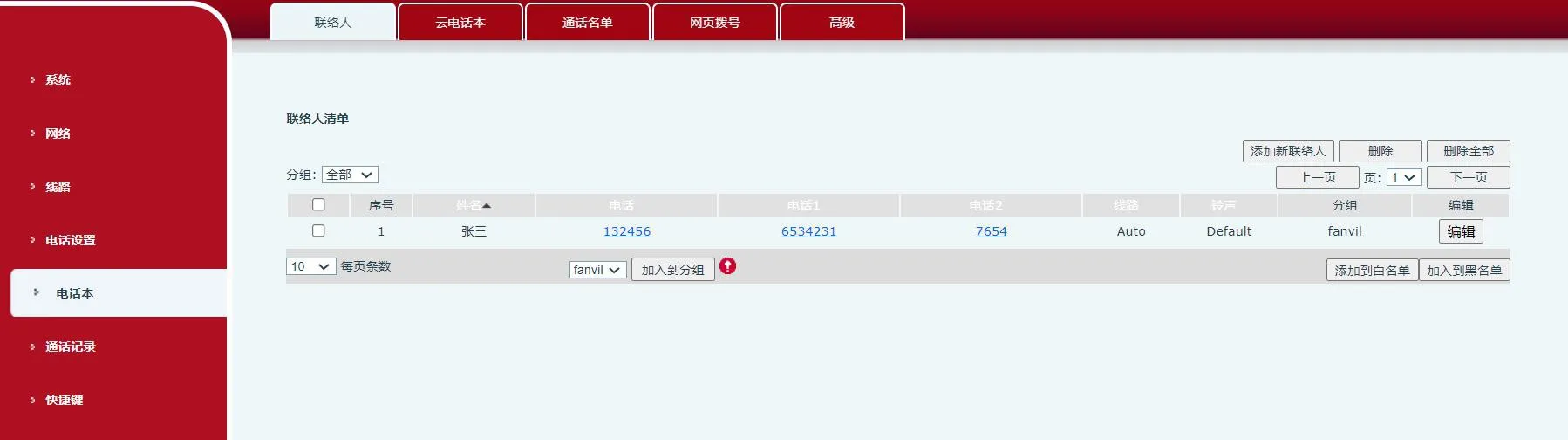
Как создать локальную телефонную книгу на промышленном телефоне?

    Введение

    Обзор

Документ предназначен для руководства пользователями по редактированию локальной телефонной книги с использованием WPS или Excel.

    Поддерживаемые модели

Все модели телефонов нашей компании (в данном документе в качестве примера используется модель BX5U)

    Необходимые материалы

① Экспортированная из телефона телефонная книга (в формате CSV).
② Табличный редактор WPS или Excel.
③ Редактор текста UltraEdit (доступен в популярных источниках загрузки).

    Пошаговая инструкция

    Вход в веб-интерфейс телефона

На экране LCD телефона нажмите “Меню” — “Статус” для просмотра IP-адреса телефона.
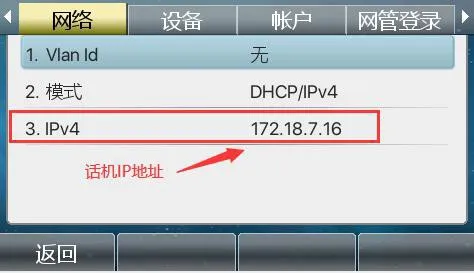
Просмотр IP-адреса телефона
Затем войдите в веб-интерфейс телефона. Откройте браузер на ПК и введите IP-адрес телефона в “строке адреса” браузера.
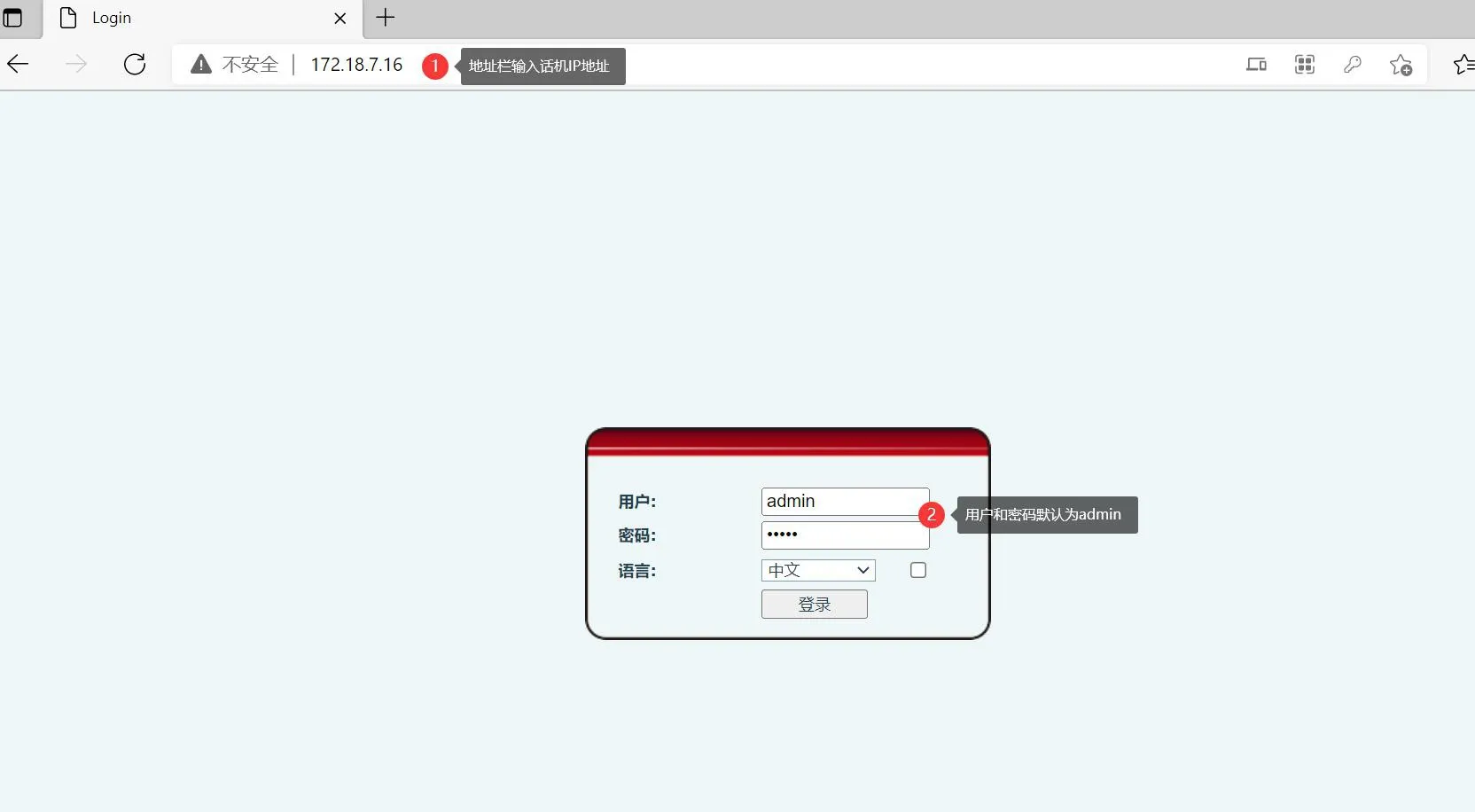
Строка адреса веб-страницы

    Добавление контактов

После входа в веб-интерфейс телефона нажмите “Телефонная книга” - “Контакты” - “Добавить новый контакт”, и сначала добавьте один контакт, как показано на Рисунке 1 и Рисунке 2 ниже.
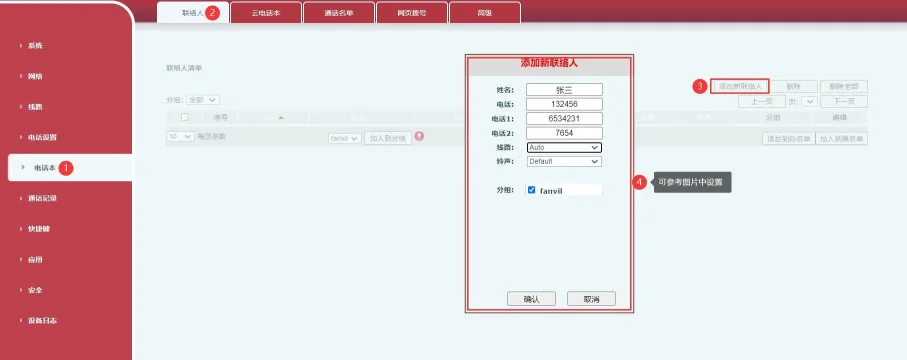
Добавление контакта в веб-интерфейсе телефона
                                                                                                                                                                     Рисунок 1
Настройка групп контактов телефона
                                                                                                                                                                     Рисунок 2
Затем экспортируйте список контактов, как показано на Рисунке 5 ниже.
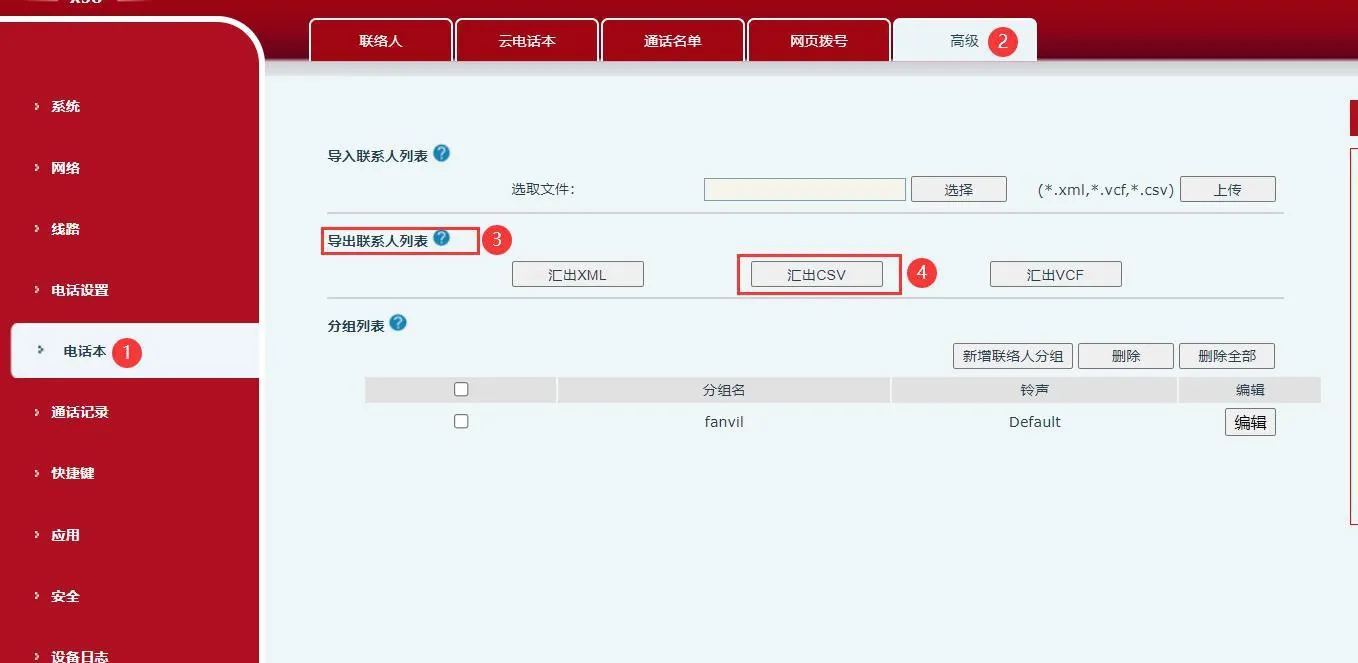
Экспорт списка контактов в веб-интерфейсе телефона 

                                                                                                                                                                      Рисунок 5

    Редактирование контактов в табличном редакторе

Используйте табличный редактор для редактирования списка контактов. Распространенные варианты: Excel или WPS. В данном документе используется WPS в качестве примера. Сначала откройте файл contact.csv, экспортированный на шаге 3, с помощью WPS, затем введите информацию о новых контактах. После ввода данных файл будет выглядеть следующим образом:

Редактирование списка контактов
Среди полей:
В столбце name (имя) введите имя контакта. В столбце work (рабочий) введите рабочий номер контакта.
В столбцы mobile (мобильный) и other (другой) введите другие номера контактов.
В столбце ring (звонок) введите мелодию для звонков. Это означает, что при входящем вызове с этого номера телефон будет использовать выбранную мелодию. В столбце groups (группы) введите название группы. Обратите внимание, что при редактировании поля группы, группа должна уже существовать на телефоне, например work (рабочая), home (домашняя) и т.д.
Сохраните отредактированный файл. Может появиться сообщение о том, что формат сохранения содержит несовместимое содержимое:
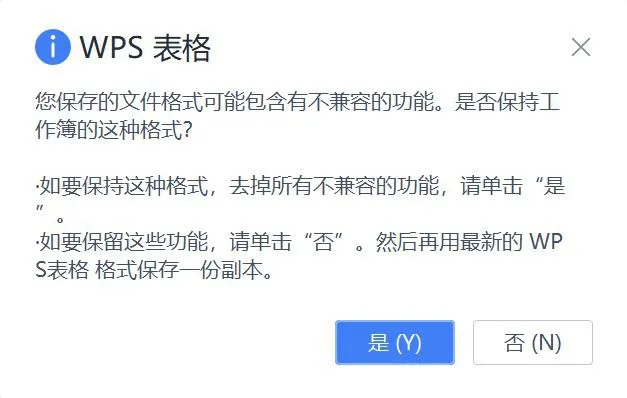
Сохранение списка контактов
Нажмите “Да” для продолжения.

    Изменение формата файла телефонной книги

В этот момент, если вы напрямую импортируете измененную телефонную книгу в телефон, импортированные записи могут отображаться как искаженный текст (кракозябры). Это происходит потому, что открытие файла с помощью WPS или Excel изменяет его исходный формат кодирования. Чтобы исправить это, используйте UltraEdit для изменения формата файла перед повторным импортом в телефон. Откройте файл телефонной книги в UltraEdit, затем выберите в строке меню “Файл” -- “Сохранить как” и обратите внимание на выбранный формат:
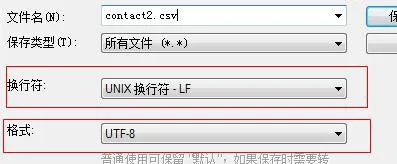
Изменение формата файла телефонной книги
Нажмите Сохранить, затем импортируйте contact2.csv в телефон через веб-интерфейс. Список контактов будет отображаться правильно, без искаженного текста.

Каталог
обслуживание клиентов Телефон
We use cookie to improve your online experience. By continuing to browse this website, you agree to our use of cookie.

Cookies

This Cookie Policy explains how we use cookies and similar technologies when you access or use our website and related services. Please read this Policy together with our Terms and Conditions and Privacy Policy so that you understand how we collect, use, and protect information.

By continuing to access or use our Services, you acknowledge that cookies and similar technologies may be used as described in this Policy, subject to applicable law and your available choices.

Updates to This Cookie Policy

We may revise this Cookie Policy from time to time to reflect changes in legal requirements, technology, or our business practices. When we make updates, the revised version will be posted on this page and will become effective from the date of publication unless otherwise required by law.

Where required, we will provide additional notice or request your consent before applying material changes that affect your rights or choices.

What Are Cookies?

Cookies are small text files placed on your device when you visit a website or interact with certain online content. They help websites recognize your browser or device, remember your preferences, support essential functionality, and improve the overall user experience.

In this Cookie Policy, the term “cookies” also includes similar technologies such as pixels, tags, web beacons, and other tracking tools that perform comparable functions.

Why We Use Cookies

We use cookies to help our website function properly, remember user preferences, enhance website performance, understand how visitors interact with our pages, and support security, analytics, and marketing activities where permitted by law.

We use cookies to keep our website functional, secure, efficient, and more relevant to your browsing experience.

Categories of Cookies We Use

Strictly Necessary Cookies

These cookies are essential for the operation of the website and cannot be disabled in our systems where they are required to provide the service you request. They are typically set in response to actions such as setting privacy preferences, signing in, or submitting forms.

Without these cookies, certain parts of the website may not function correctly.

Functional Cookies

Functional cookies enable enhanced features and personalization, such as remembering your preferences, language settings, or previously selected options. These cookies may be set by us or by third-party providers whose services are integrated into our website.

If you disable these cookies, some services or features may not work as intended.

Performance and Analytics Cookies

These cookies help us understand how visitors use our website by collecting information such as traffic sources, page visits, navigation behavior, and general interaction patterns. In many cases, this information is aggregated and does not directly identify individual users.

We use this information to improve website performance, usability, and content relevance.

Targeting and Advertising Cookies

These cookies may be placed by our advertising or marketing partners to help deliver more relevant ads and measure the effectiveness of campaigns. They may use information about your browsing activity across different websites and services to build a profile of your interests.

These cookies generally do not store directly identifying personal information, but they may identify your browser or device.

First-Party and Third-Party Cookies

Some cookies are set directly by our website and are referred to as first-party cookies. Other cookies are set by third-party services, such as analytics providers, embedded content providers, or advertising partners, and are referred to as third-party cookies.

Third-party providers may use their own cookies in accordance with their own privacy and cookie policies.

Information Collected Through Cookies

Depending on the type of cookie used, the information collected may include browser type, device type, IP address, referring website, pages viewed, time spent on pages, clickstream behavior, and general usage patterns.

This information helps us maintain the website, improve performance, enhance security, and provide a better user experience.

Your Cookie Choices

You can control or disable cookies through your browser settings and, where available, through our cookie consent or preference management tools. Depending on your location, you may also have the right to accept or reject certain categories of cookies, especially those used for analytics, personalization, or advertising purposes.

Please note that blocking or deleting certain cookies may affect the availability, functionality, or performance of some parts of the website.

Restricting cookies may limit certain features and reduce the quality of your experience on the website.

Cookies in Mobile Applications

Where our mobile applications use cookie-like technologies, they are generally limited to those required for core functionality, security, and service delivery. Disabling these essential technologies may affect the normal operation of the application.

We do not use essential mobile application cookies to store unnecessary personal information.

How to Manage Cookies

Most web browsers allow you to manage cookies through browser settings. You can usually choose to block, delete, or receive alerts before cookies are stored. Because browser controls vary, please refer to your browser provider’s support documentation for details on how to manage cookie settings.

Contact Us

If you have any questions about this Cookie Policy or our use of cookies and similar technologies, please contact us at support@becke.cc .