BX7A Industrial SIP Phone Bluetooth Mobile Line Feature & User Guide

Описание функции

Обзор

Линия Bluetooth мобильной связи BX7A подключается к мобильным телефонам (поддерживаются Android и iOS) и управляет мобильными звонками. Основные функции:

  1. Синхронизация контактов

  2. Настройка клавиш DSS

  3. Исходящие и входящие звонки

  4. Удержание / возобновление звонка

  5. Отключение / включение микрофона

  6. Регулировка громкости

  7. Ввод DTMF во время разговора

Подробные функции линии Bluetooth мобильной связи

Синхронизация контактов

  1. Включите Bluetooth на телефоне: перейдите в Настройки телефона → Подключенные устройства → Включить Bluetooth. Выполните сопряжение и подключение телефона. Появится запрос: «Синхронизировать контакты?»

  2. Нажмите «Да», чтобы синхронизировать контакты с IP-телефоном (при выборе «Нет» синхронизация в реальном времени отключается). Просматривайте контакты в разделе мобильных контактов.        
    • При добавлении/удалении мобильных контактов нажмите обновить на телефоне для синхронизации.        
    • Без нажатия кнопки обновления контакты не обновляются автоматически.

Настройка клавиш DSS

Установите тип клавиши DSS на Мобильная.
• Зеленый значок = Bluetooth подключен
• Серый значок = Отключено / вне зоны действия
• При возврате в зону действия: зеленый значок мигает → выполняется переподключение → значок горит зеленым постоянно

Исходящие и входящие звонки (линия Bluetooth)

  1. Исходящие звонки: Настройте клавишу DSS как Линия → Мобильная (веб-интерфейс или LCD-дисплей). Нажмите клавишу мобильной линии, наберите номер и совершите звонок.

  2. Входящие звонки: Позвоните на номер сопряженного мобильного телефона. Ответьте на звонок с устройства BX7A (в режиме громкой связи, трубки или гарнитуры).

Удержание / возобновление

Функции удержания и снятия с удержания корректно работают при звонках по Bluetooth. Качество звука четкое. Статус звонка синхронизируется между IP-телефоном и мобильным устройством.

Отключение / включение микрофона

Функции отключения и включения микрофона работают корректно во время разговоров.

Регулировка громкости

Громкость разговора можно нормально регулировать на телефоне во время звонка.

Ввод DTMF во время разговора

Ввод DTMF-кодов поддерживается в обычном режиме во время разговора.

Функция синхронизации контактов

Описание функции

BX7A умеет синхронизировать стандартные контакты с сопряженных мобильных телефонов (Android & iOS).
Примечание: Синхронизация истории звонков пока не поддерживается.

Порядок действий

Нажмите кнопку «Развернуть» на правой стороне BX7A. Длительно нажмите клавишу SIP для настройки:
• Заголовок: произвольное имя
• Тип: «Линия»
• Линия: «Мобильная»
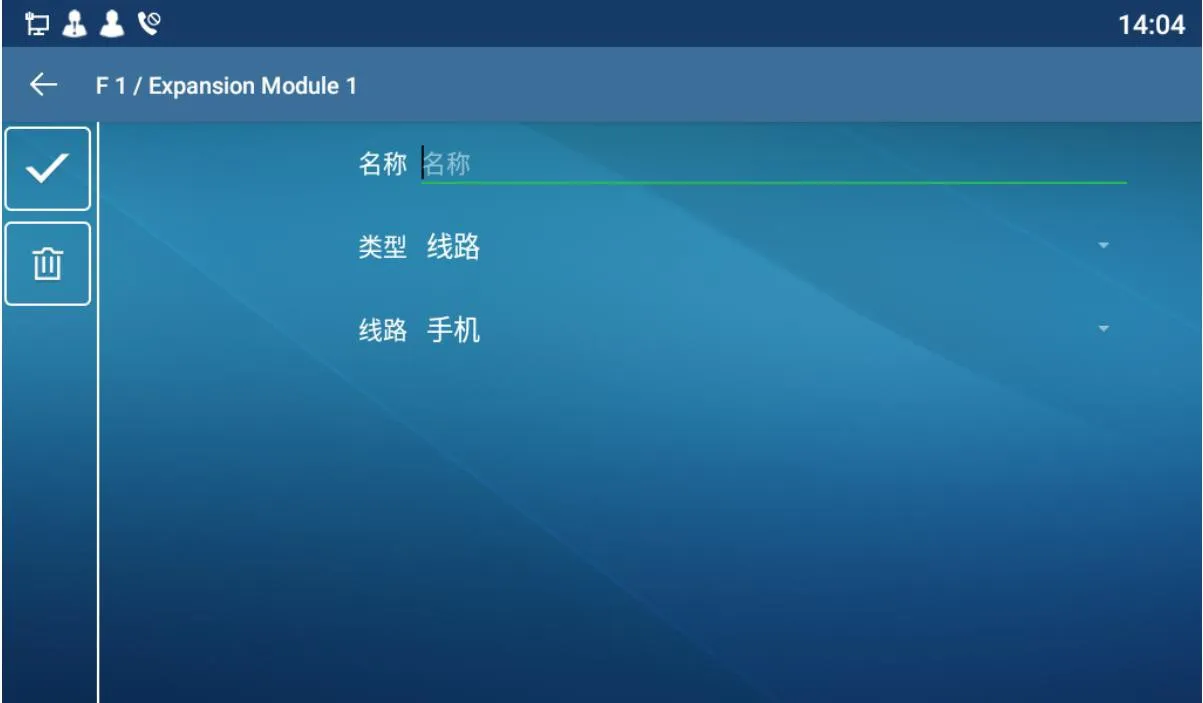
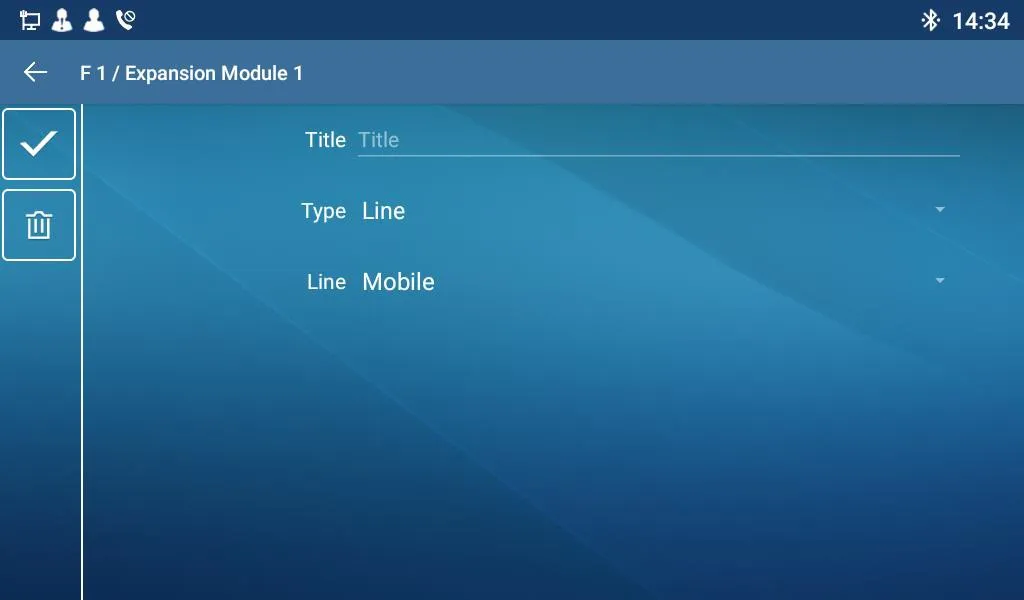
Custom Title Configuration InterfaceTitle Customization Settings

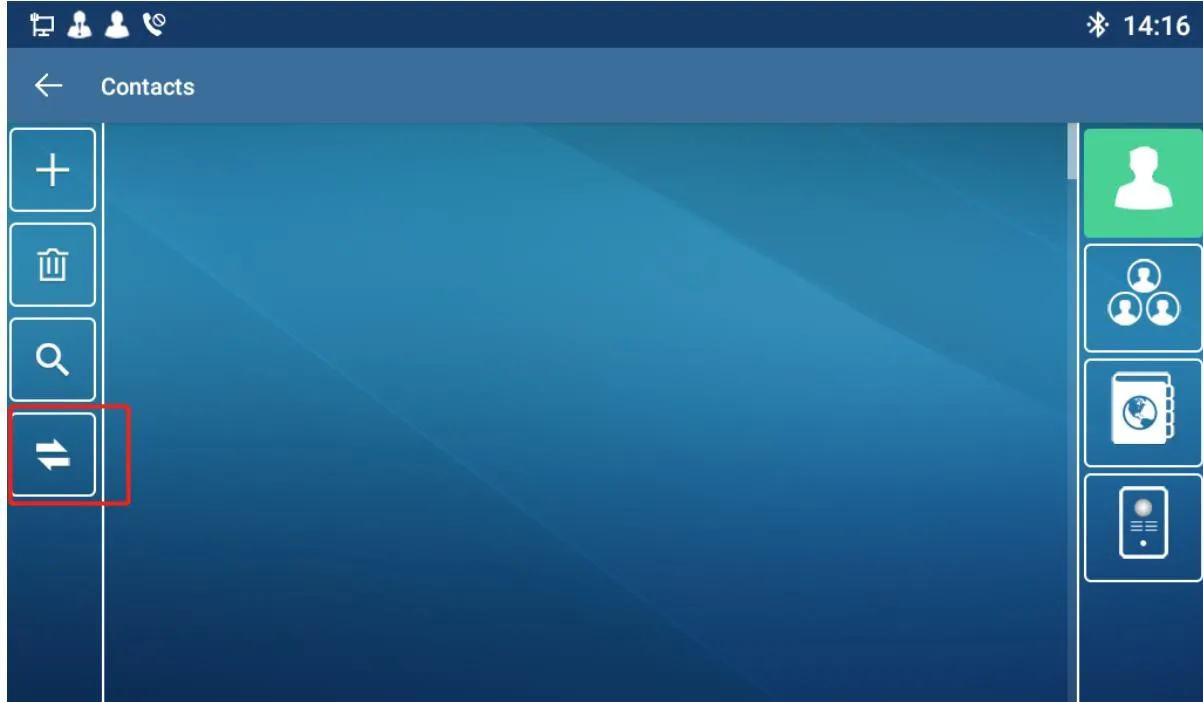
  1. Откройте интерфейс контактов BX7A → нажмите кнопку синхронизации слева.
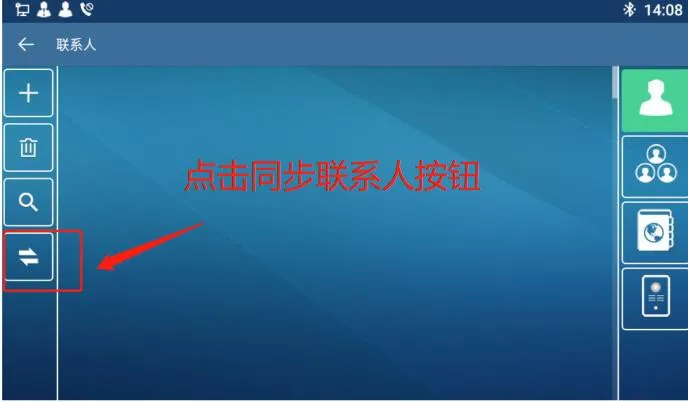
BX7A Contacts InterfaceBX7A Contacts Sync Settings

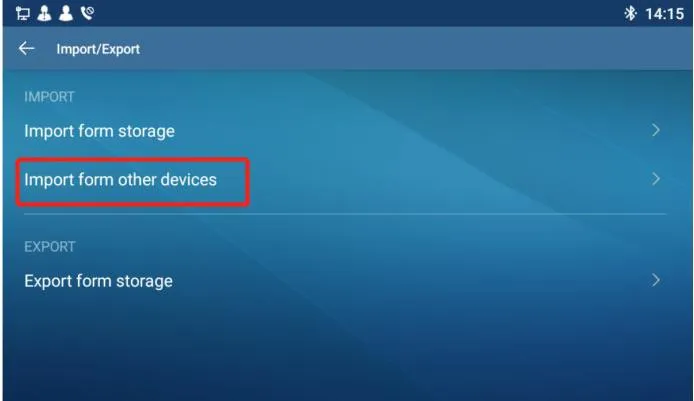
  1. Выберите второй вариант в разделе Импорт: Импорт с другого устройства.
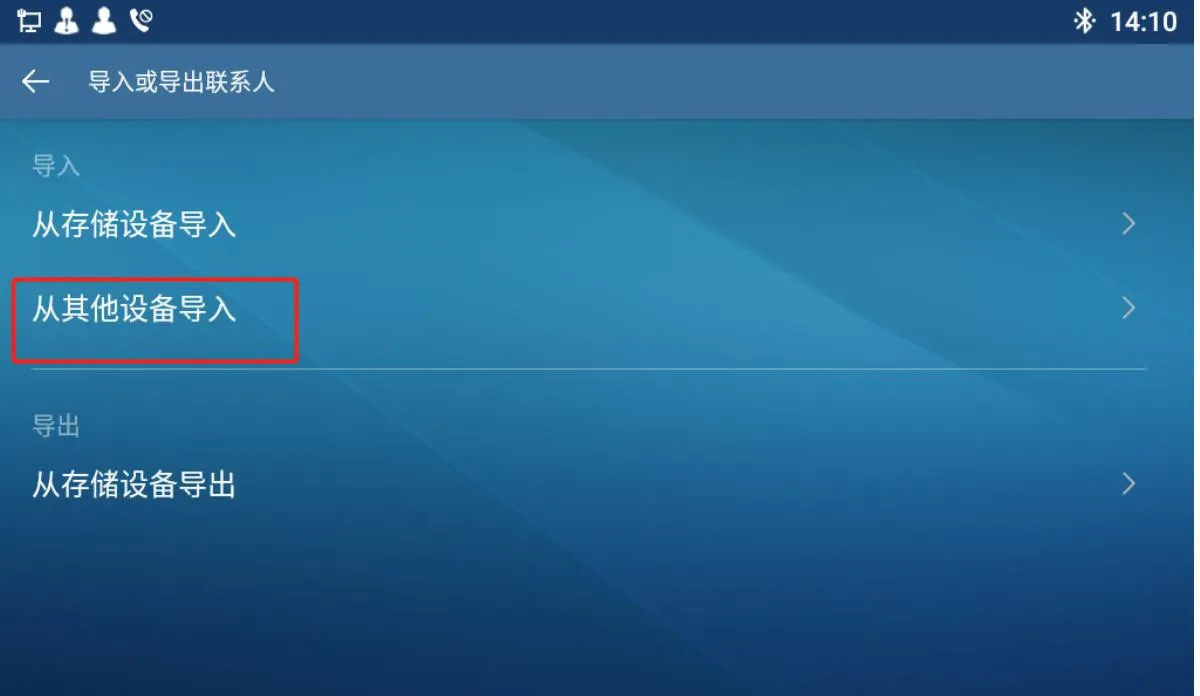
BX7A Import Contacts InterfaceBX7A Import Contacts Interface

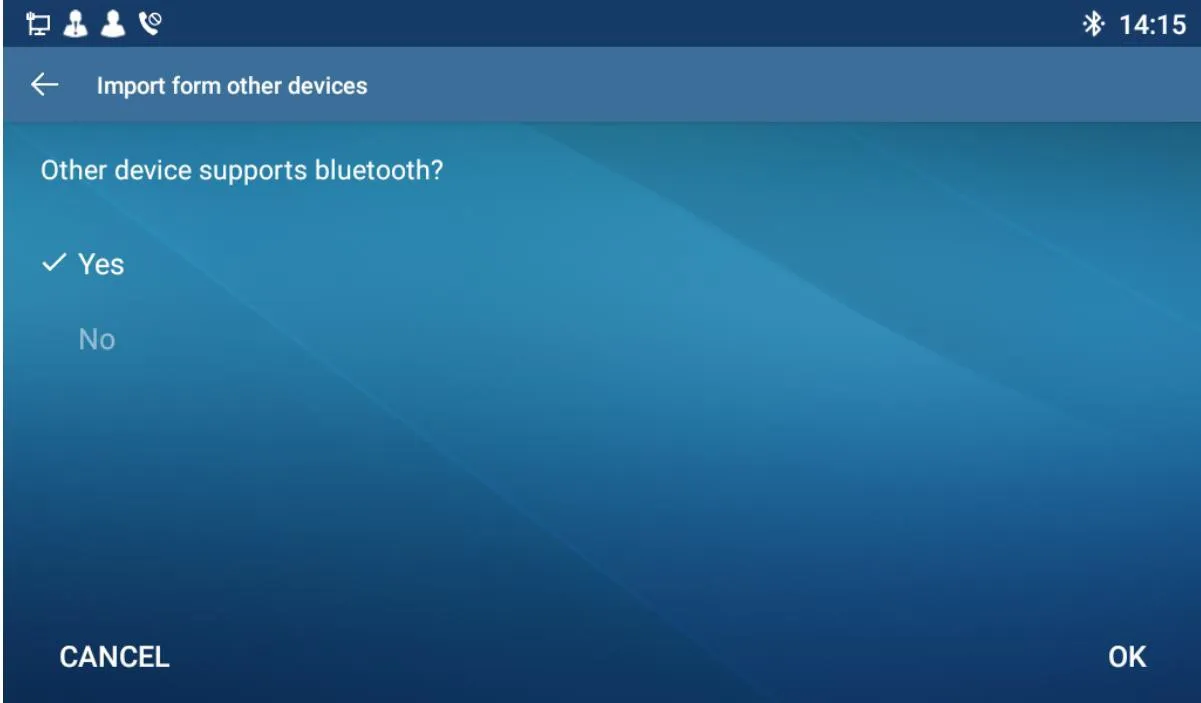
  1. Если ваш телефон поддерживает Bluetooth, выберите «Да»ОК.        
    При выборе «Нет» используется режим по умолчанию: Импорт из памяти телефона.
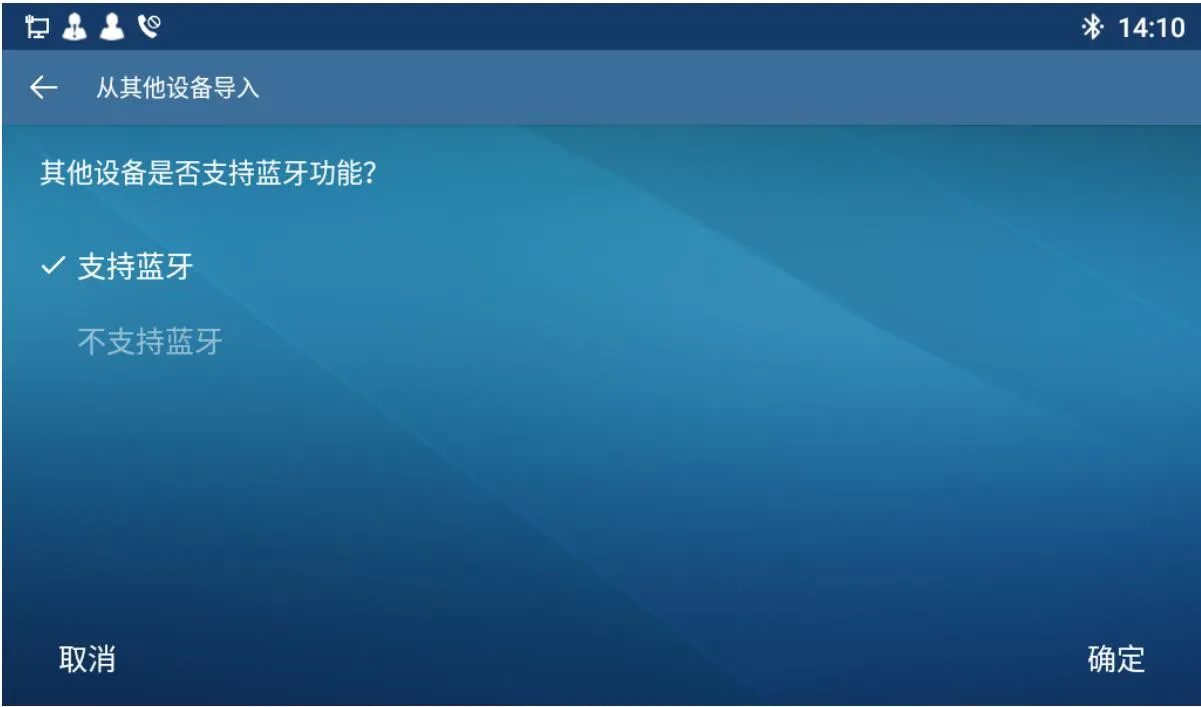
Bluetooth Device Contact ImportSelect Bluetooth Device

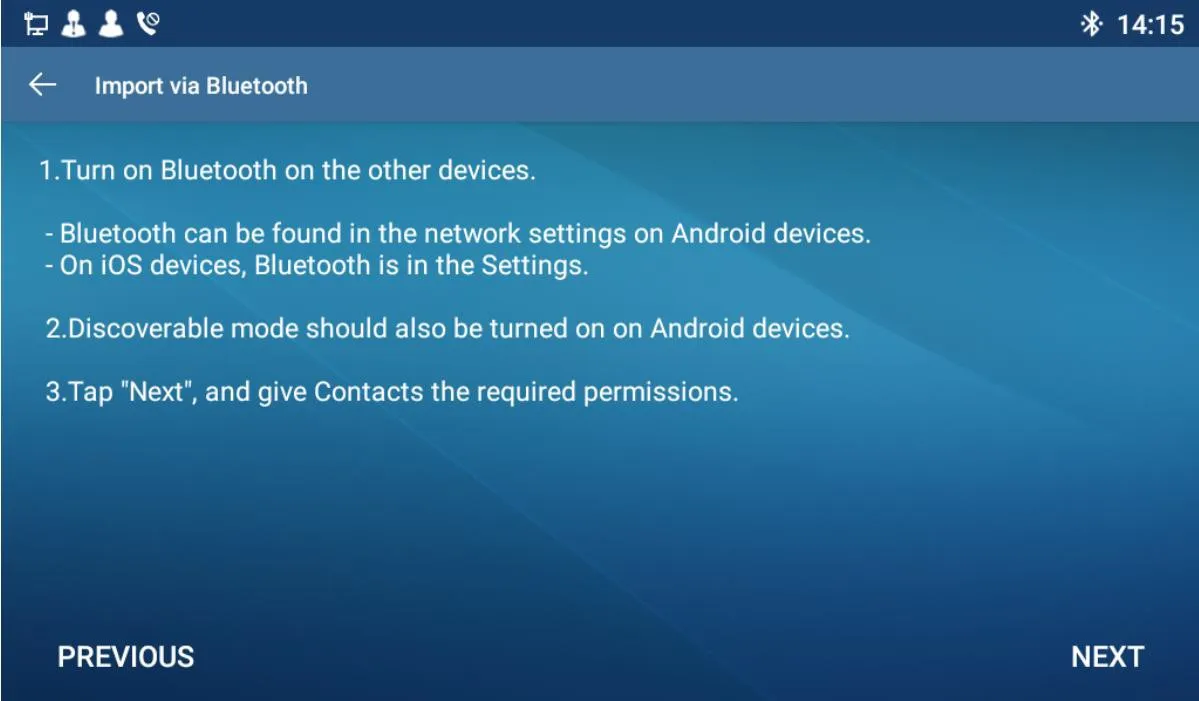
  1. На этой странице отображаются инструкции по синхронизации. Нажмите Далее для продолжения.
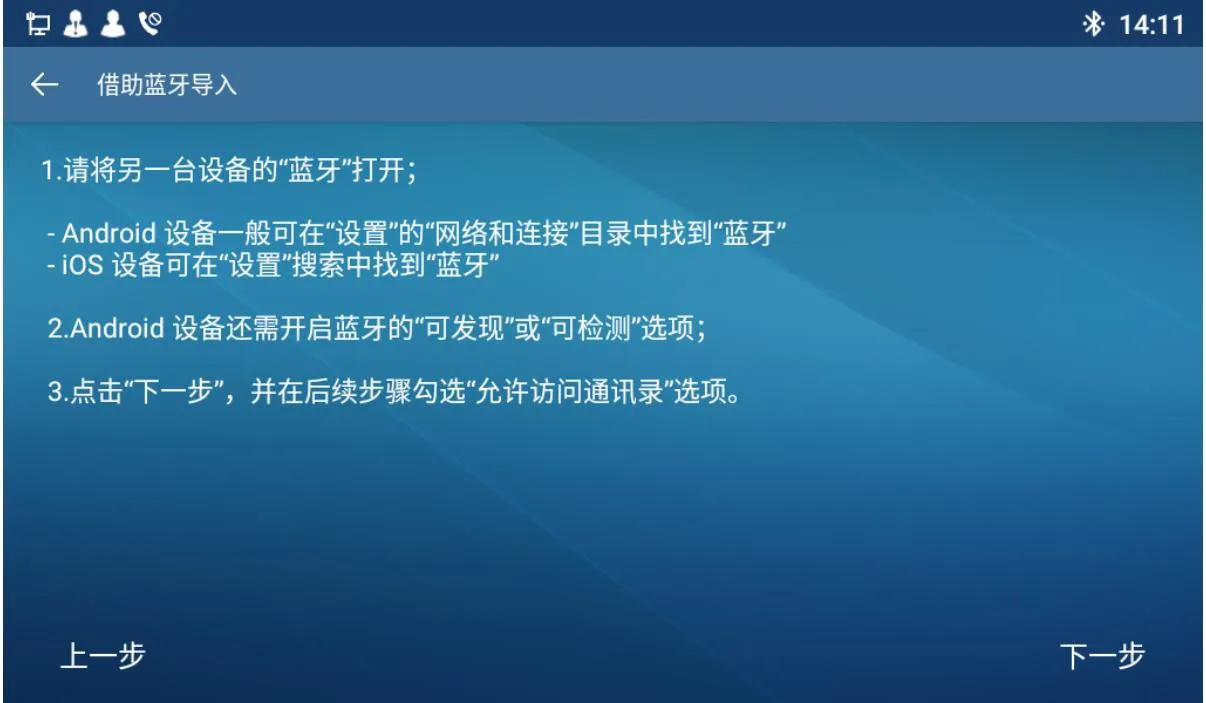
Bluetooth Contact Import GuideImport Contacts via Bluetooth

  1. Выберите сопряженное устройство Bluetooth (отображаются только подключенные устройства).        
    Если устройства не найдены: система перенаправит в настройки Bluetooth для предварительного сопряжения. Затем вернитесь и нажмите Повторный поиск.
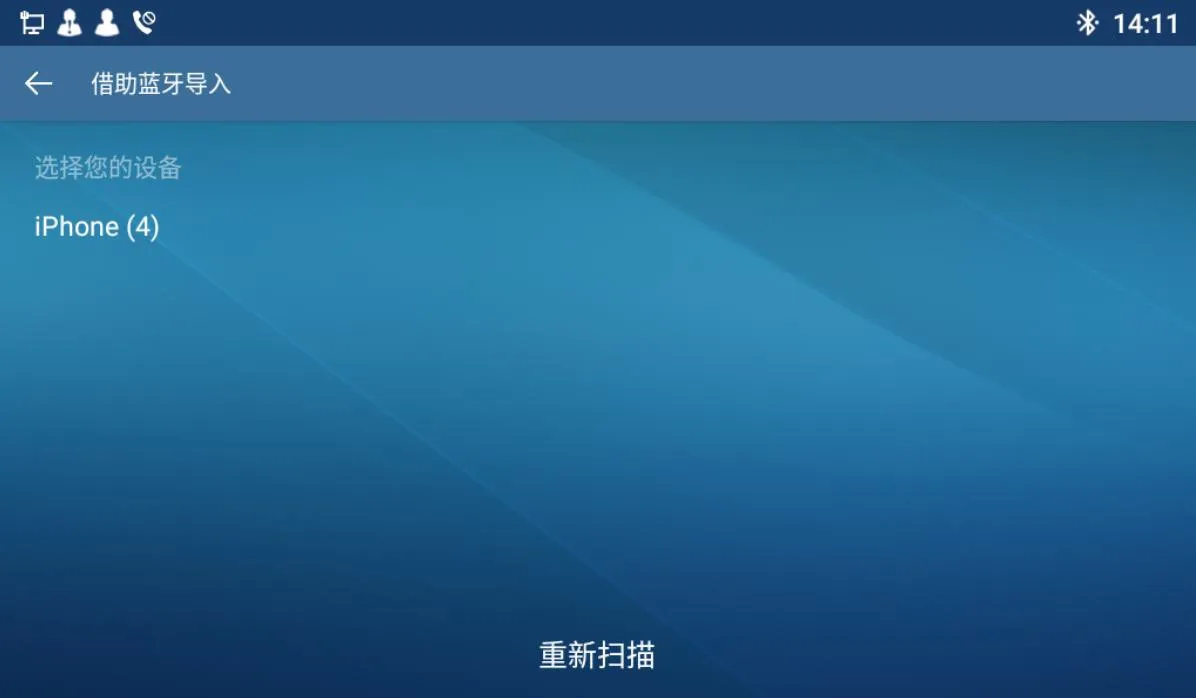
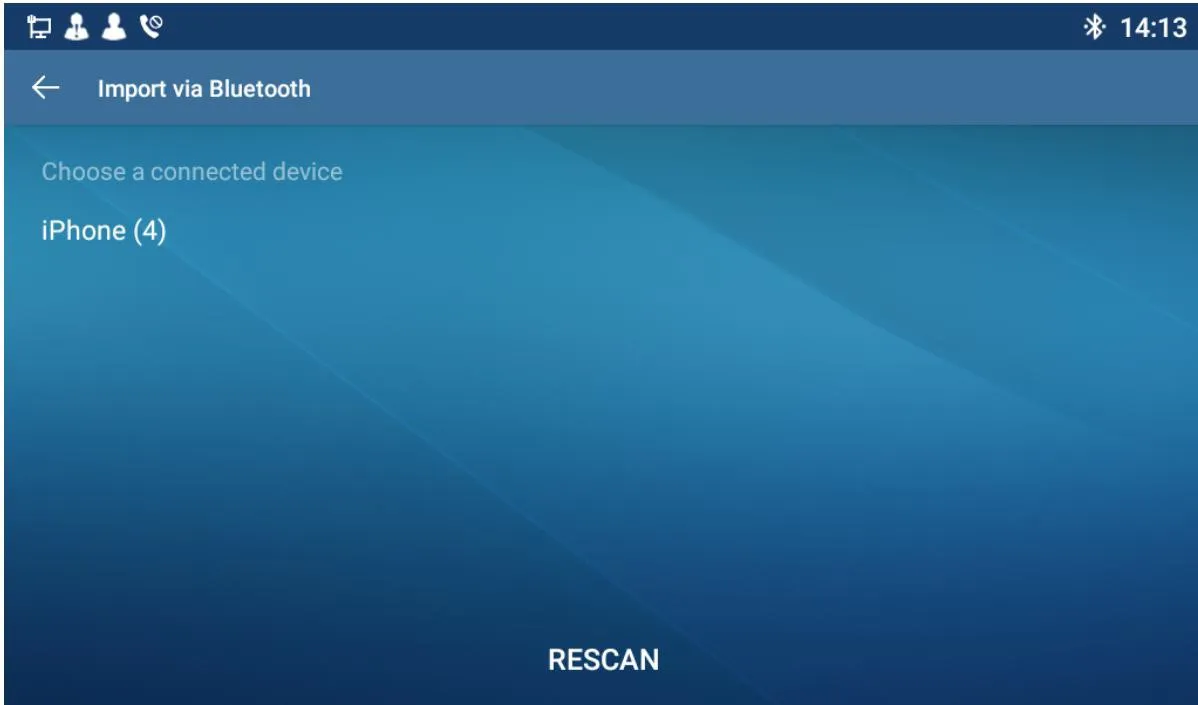
Bluetooth Contact Import InterfaceRefresh Bluetooth List

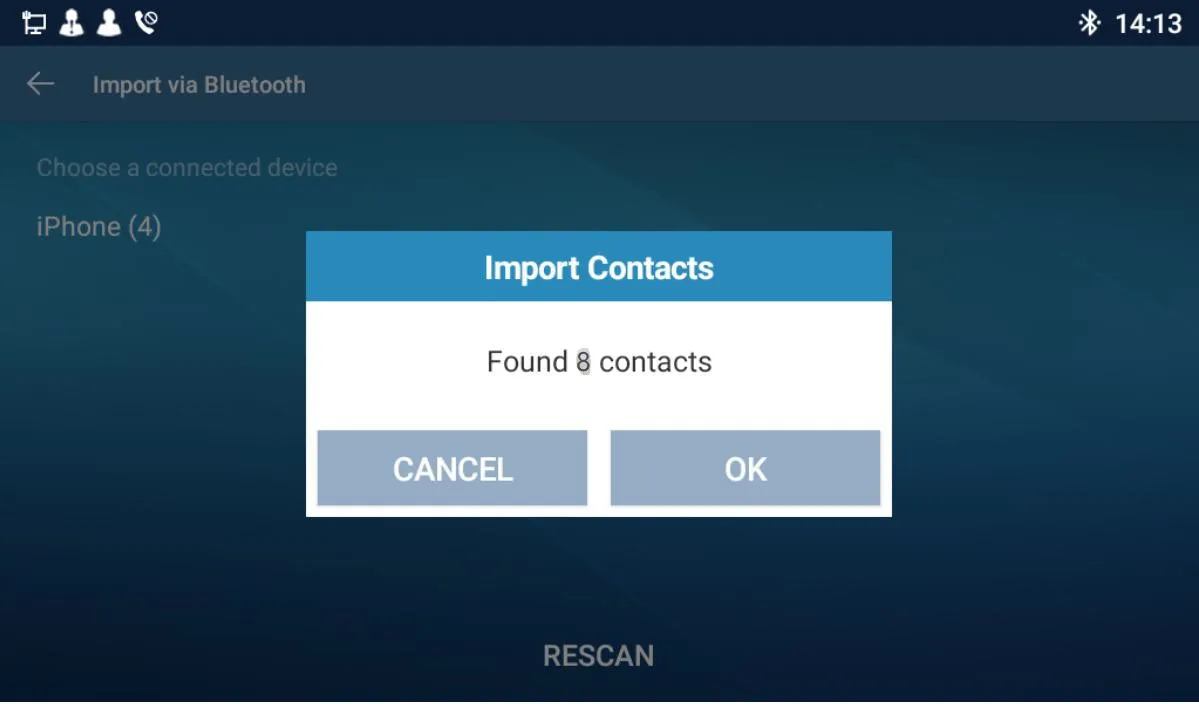
  1. После успешной синхронизации с мобильным телефоном появится окно с общим количеством контактов.        
    Нажмите ОК, чтобы сохранить контакты в BX7A.        
    Нажмите Отмена, чтобы отменить сохранение.
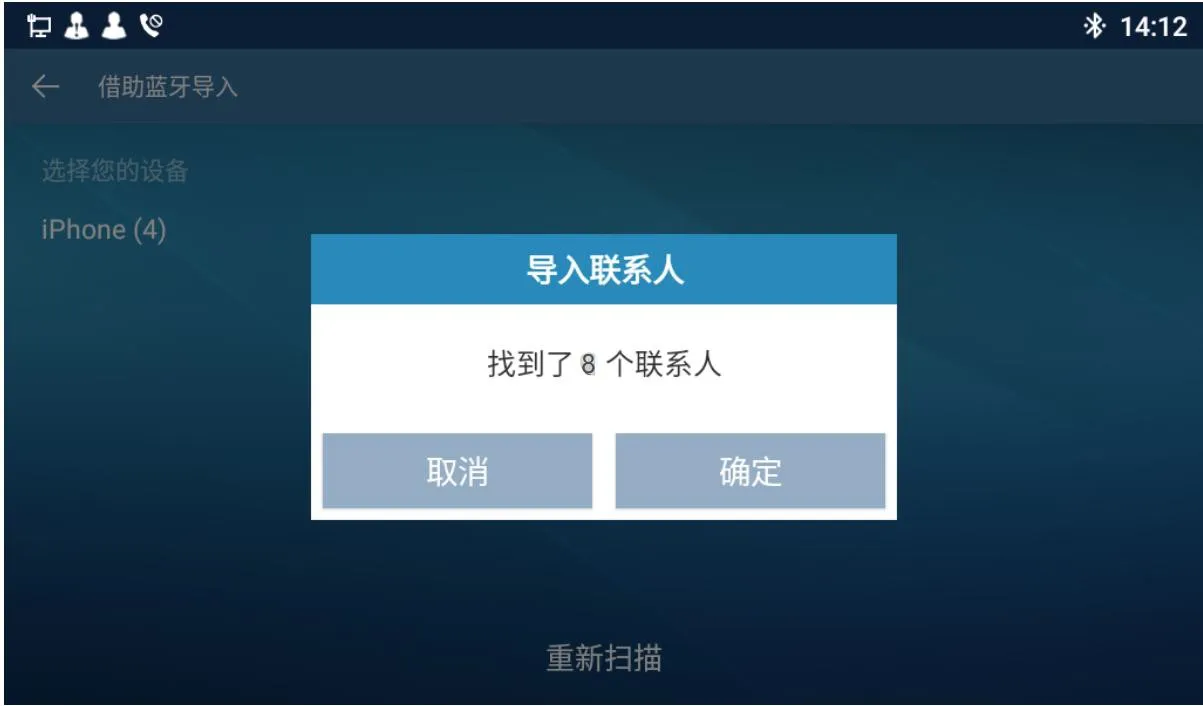
Contact Sync InterfaceConfirm Contact Sync

  1. После успешного сохранения телефон вернется на главный экран контактов. Синхронизация завершена.

Примечание: Интерфейс поддерживает английский, упрощенный китайский и традиционный китайский языки.

Каталог
обслуживание клиентов Телефон
We use cookie to improve your online experience. By continuing to browse this website, you agree to our use of cookie.

Cookies

This Cookie Policy explains how we use cookies and similar technologies when you access or use our website and related services. Please read this Policy together with our Terms and Conditions and Privacy Policy so that you understand how we collect, use, and protect information.

By continuing to access or use our Services, you acknowledge that cookies and similar technologies may be used as described in this Policy, subject to applicable law and your available choices.

Updates to This Cookie Policy

We may revise this Cookie Policy from time to time to reflect changes in legal requirements, technology, or our business practices. When we make updates, the revised version will be posted on this page and will become effective from the date of publication unless otherwise required by law.

Where required, we will provide additional notice or request your consent before applying material changes that affect your rights or choices.

What Are Cookies?

Cookies are small text files placed on your device when you visit a website or interact with certain online content. They help websites recognize your browser or device, remember your preferences, support essential functionality, and improve the overall user experience.

In this Cookie Policy, the term “cookies” also includes similar technologies such as pixels, tags, web beacons, and other tracking tools that perform comparable functions.

Why We Use Cookies

We use cookies to help our website function properly, remember user preferences, enhance website performance, understand how visitors interact with our pages, and support security, analytics, and marketing activities where permitted by law.

We use cookies to keep our website functional, secure, efficient, and more relevant to your browsing experience.

Categories of Cookies We Use

Strictly Necessary Cookies

These cookies are essential for the operation of the website and cannot be disabled in our systems where they are required to provide the service you request. They are typically set in response to actions such as setting privacy preferences, signing in, or submitting forms.

Without these cookies, certain parts of the website may not function correctly.

Functional Cookies

Functional cookies enable enhanced features and personalization, such as remembering your preferences, language settings, or previously selected options. These cookies may be set by us or by third-party providers whose services are integrated into our website.

If you disable these cookies, some services or features may not work as intended.

Performance and Analytics Cookies

These cookies help us understand how visitors use our website by collecting information such as traffic sources, page visits, navigation behavior, and general interaction patterns. In many cases, this information is aggregated and does not directly identify individual users.

We use this information to improve website performance, usability, and content relevance.

Targeting and Advertising Cookies

These cookies may be placed by our advertising or marketing partners to help deliver more relevant ads and measure the effectiveness of campaigns. They may use information about your browsing activity across different websites and services to build a profile of your interests.

These cookies generally do not store directly identifying personal information, but they may identify your browser or device.

First-Party and Third-Party Cookies

Some cookies are set directly by our website and are referred to as first-party cookies. Other cookies are set by third-party services, such as analytics providers, embedded content providers, or advertising partners, and are referred to as third-party cookies.

Third-party providers may use their own cookies in accordance with their own privacy and cookie policies.

Information Collected Through Cookies

Depending on the type of cookie used, the information collected may include browser type, device type, IP address, referring website, pages viewed, time spent on pages, clickstream behavior, and general usage patterns.

This information helps us maintain the website, improve performance, enhance security, and provide a better user experience.

Your Cookie Choices

You can control or disable cookies through your browser settings and, where available, through our cookie consent or preference management tools. Depending on your location, you may also have the right to accept or reject certain categories of cookies, especially those used for analytics, personalization, or advertising purposes.

Please note that blocking or deleting certain cookies may affect the availability, functionality, or performance of some parts of the website.

Restricting cookies may limit certain features and reduce the quality of your experience on the website.

Cookies in Mobile Applications

Where our mobile applications use cookie-like technologies, they are generally limited to those required for core functionality, security, and service delivery. Disabling these essential technologies may affect the normal operation of the application.

We do not use essential mobile application cookies to store unnecessary personal information.

How to Manage Cookies

Most web browsers allow you to manage cookies through browser settings. You can usually choose to block, delete, or receive alerts before cookies are stored. Because browser controls vary, please refer to your browser provider’s support documentation for details on how to manage cookie settings.

Contact Us

If you have any questions about this Cookie Policy or our use of cookies and similar technologies, please contact us at support@becke.cc .