
Как настроить блокировку видео для систем внутренней связи?

Введение

Обзор

Системы контроля доступа/переговорные устройства могут подключаться к сторонним IP-камерам в локальной сети. Во время вызова с удаленной стороной удаленный конец может одновременно слышать аудио от системы контроля доступа/переговорного устройства и просматривать видео с подключенной камеры. В этом документе описано, как подключить устройства контроля доступа и переговорные устройства Fanvil с сторонними IP-камерами.
Применимые модели

Переговорное устройство: Bi12; Голосовой контроль доступа Fanvil: BHP-SOS20, BHP-SOS23; Шлюз Fanvil: BK-DAB-PA2; Вспомогательный видеотелефон: BF600S

Инструменты для предварительной подготовки

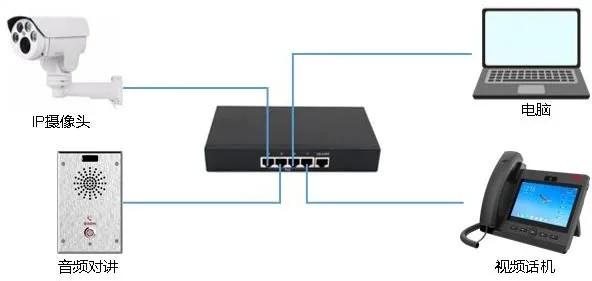
1. Одно переговорное устройство Bi12, один видеотелефон BF600S и одна IP-камера, все подключенные к PoE-коммутатору для обеспечения нормальной сетевой связи
2. Один отладочный компьютер с сетевым подключением ко всем остальным устройствам
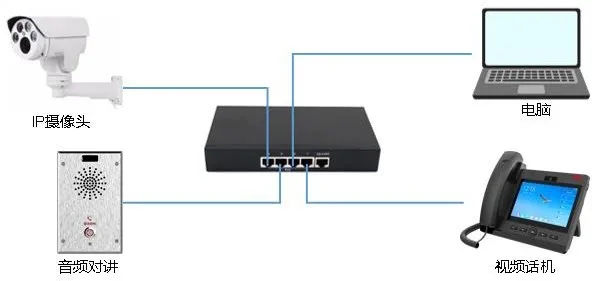
Схема подключения устройства и компьютера

Device & Computer Connection Diagram

Подтверждение и настройка информации камеры

Настройка IP-адреса камеры

В этом сценарии применения IP-камера ДОЛЖНА быть настроена на статический IP-адрес. За конкретными методами настройки обращайтесь к производителю IP-камеры. Здесь мы берем камеры Hikvision в качестве примера:
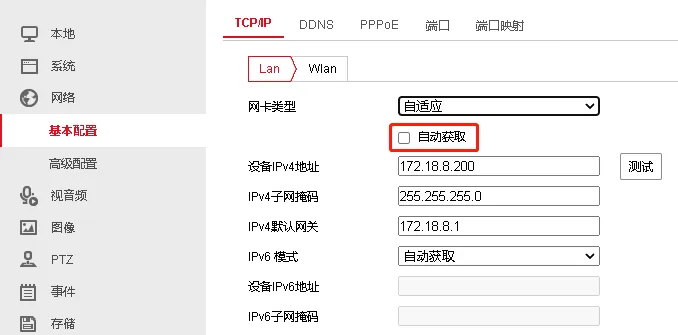
Camera IP Configuration<

Снимите флажок с опции “Автоматическое получение” и введите IP-адрес вручную

Настройка видеопотока камеры

Поддерживаемые видеоспецификации для видеотелефона BF600S: кодировка H264, разрешение 1080P или ниже; рекомендуется разрешение 720P или ниже. Поэтому вам необходимо подтвердить поток и разрешение, используемые камерой. На примере камер Hikvision:

  • Подтвердите, используется ли основной поток, дополнительный поток или третий поток

  • Подтвердите, что тип кодировки — H264

  • Подтвердите, что разрешение потока меньше или равно разрешению, поддерживаемому видеотелефоном. В этом примере используется рекомендуемое видеоразрешение 720P
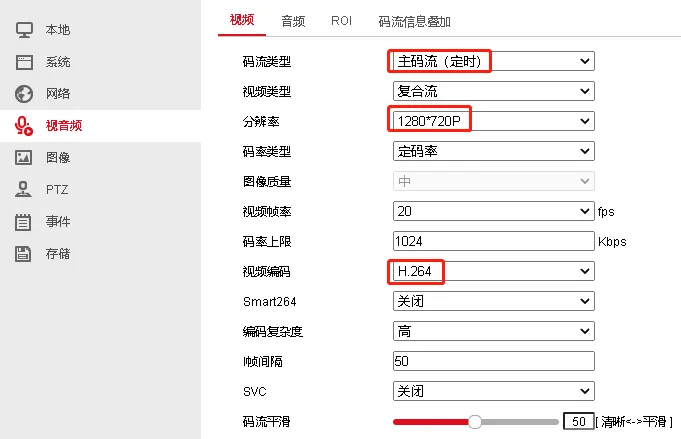
Camera Video Stream Configuration
Примечание: Некоторые видеотелефоны поддерживают только H264, Базовый профиль и разрешение VGA. В этом случае соответствующим образом отрегулируйте настройки камеры. Базовый профиль соответствует низкой сложности кодирования на камерах Hikvision

Подтверждение URL-адреса RTSP камеры

При настройке аудиопереговорного устройства для подключения к камере переговорное устройство использует URL-адрес RTSP камеры для получения видеопотока. Формат URL-адреса RTSP различается в зависимости от производителя, поэтому вам нужно обратиться к производителю камеры за правильным URL-адресом RTSP. На примере камер Hikvision URL-адрес RTSP:
rtsp://admin:Fangwei123@172.18.8.200:554/ISAPI/streaming/channels/101
Где:

  • Rtsp — это заголовок URL, указывающий на URL-адрес RTSP

  • Admin:Fangwei123 — имя пользователя и пароль для доступа к URL-адресу RTSP, обычно совпадающие с учетными данными для веб-входа в камеру

  • IP-адрес и порт — адрес доступа к камере и порт RTSP

  • 101 означает основной поток, 102 — дополнительный поток, 103 — третий поток

Список URL-адресов RTSP для распространенных производителей камер представлен в разделе 4

Настройка переговорного устройства

Настройка подключенной камеры

Для переговорных устройств и устройств PA: Перейдите в ВЕБНастройки переговорного устройстваНастройки видео.
Для устройств контроля доступа: Перейдите в ВЕБНастройки контроля доступаНастройки видео.
Для предварительно совместимых камер настройте следующим образом:
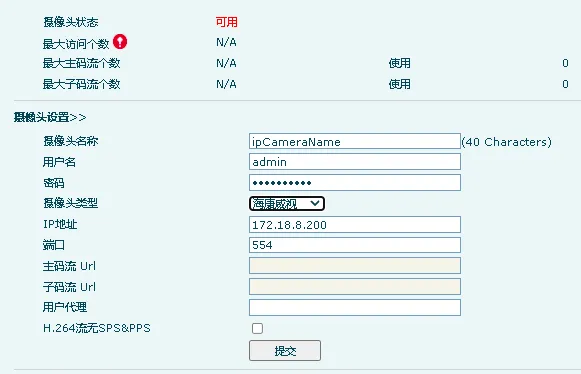
Device Video Settings<

Имя пользователя: Имя пользователя для доступа к потоку RTSP (совпадает с веб-именем пользователя камеры)
Пароль: Пароль для доступа к потоку RTSP (совпадает с веб-паролем камеры)
Выберите тип камеры
IP-адрес: IP-адрес камеры
Порт: Порт RTSP камеры
Если подключенная камера отсутствует в списке типов, выберите Пользовательский и введите URL-адрес потока RTSP. Примеры форматов:
Основной поток: rtsp://admin:Fangwei123@172.18.8.200:554/ISAPI/streaming/channels/101
Дополнительный поток: rtsp://admin:Fangwei123@172.18.8.200:554/ISAPI/streaming/channels/102
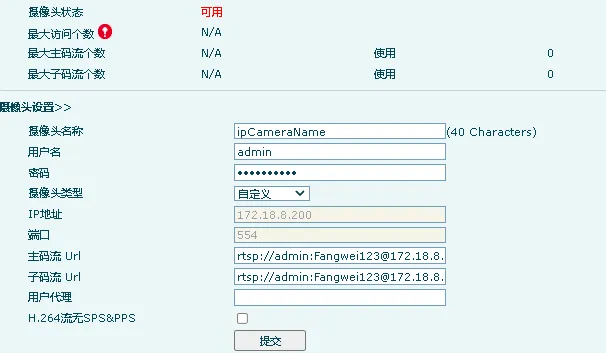
Camera Port Configuration

Настройка ярлыка быстрого набора

Ярлыки используются для однокнопочного вызова с устройства контроля доступа/переговорного устройства на IP-видеотелефон. Перед использованием требуется настройка.
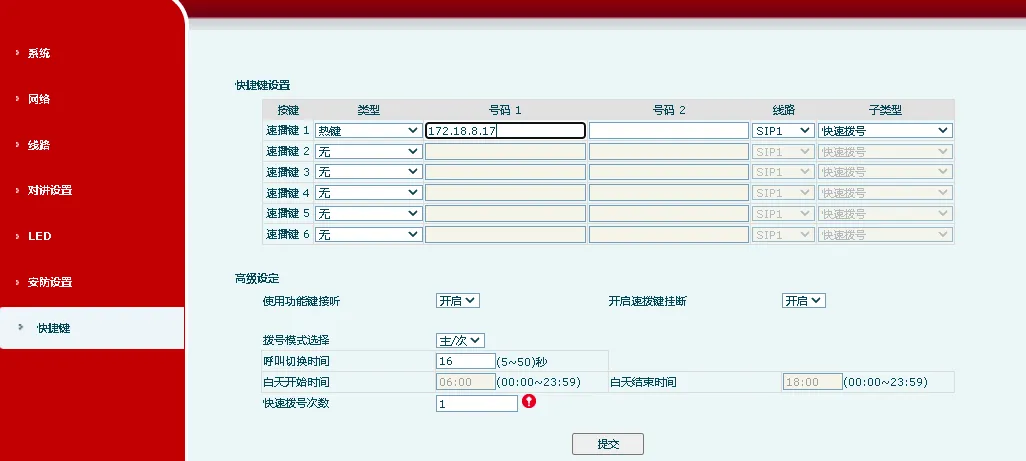
Speed Dial Shortcut Configuration
Тип ярлыка: Горячая клавиша
Номер 1: Вызываемый номер или IP-адрес
Подтип: Быстрый набор
Дополнительные настройки, связанные с вызовами, см. в другой документации.

URL-адреса RTSP для распространенных производителей камер

Камеры Hikvision:
Основной поток: rtsp://admin:Fangwei123@172.18.8.200:554/ISAPI/streaming/channels/101
Дополнительный поток: rtsp://admin:Fangwei123@172.18.8.200:554/ISAPI/streaming/channels/102
Где: admin:Fangwei123 — имя пользователя и пароль; 101 = основной поток, 102 = дополнительный поток, 103 = третий поток
Камеры Dahua:
Основной поток: rtsp://имя_пользователя:пароль@ip:порт/cam/realmonitor?channel=1&subtype=0
Дополнительный поток: rtsp://имя_пользователя:пароль@ip:порт/cam/realmonitor?channel=1&subtype=1
Где: имя_пользователя:пароль — учетные данные, разделенные двоеточием; subtype=0 = основной поток, subtype=1 = дополнительный поток
Камеры XiongMai:
Основной поток: rtsp://10.6.3.57:554/user=admin&password=&channel=1&stream=0.sdp?
Дополнительный поток: rtsp://10.6.3.57:554/user=admin&password=&channel=1&stream=1.sdp?

Каталог
обслуживание клиентов Телефон
We use cookie to improve your online experience. By continuing to browse this website, you agree to our use of cookie.

Cookies

This Cookie Policy explains how we use cookies and similar technologies when you access or use our website and related services. Please read this Policy together with our Terms and Conditions and Privacy Policy so that you understand how we collect, use, and protect information.

By continuing to access or use our Services, you acknowledge that cookies and similar technologies may be used as described in this Policy, subject to applicable law and your available choices.

Updates to This Cookie Policy

We may revise this Cookie Policy from time to time to reflect changes in legal requirements, technology, or our business practices. When we make updates, the revised version will be posted on this page and will become effective from the date of publication unless otherwise required by law.

Where required, we will provide additional notice or request your consent before applying material changes that affect your rights or choices.

What Are Cookies?

Cookies are small text files placed on your device when you visit a website or interact with certain online content. They help websites recognize your browser or device, remember your preferences, support essential functionality, and improve the overall user experience.

In this Cookie Policy, the term &ldquo;cookies&rdquo; also includes similar technologies such as pixels, tags, web beacons, and other tracking tools that perform comparable functions.

Why We Use Cookies

We use cookies to help our website function properly, remember user preferences, enhance website performance, understand how visitors interact with our pages, and support security, analytics, and marketing activities where permitted by law.

We use cookies to keep our website functional, secure, efficient, and more relevant to your browsing experience.

Categories of Cookies We Use

Strictly Necessary Cookies

These cookies are essential for the operation of the website and cannot be disabled in our systems where they are required to provide the service you request. They are typically set in response to actions such as setting privacy preferences, signing in, or submitting forms.

Without these cookies, certain parts of the website may not function correctly.

Functional Cookies

Functional cookies enable enhanced features and personalization, such as remembering your preferences, language settings, or previously selected options. These cookies may be set by us or by third-party providers whose services are integrated into our website.

If you disable these cookies, some services or features may not work as intended.

Performance and Analytics Cookies

These cookies help us understand how visitors use our website by collecting information such as traffic sources, page visits, navigation behavior, and general interaction patterns. In many cases, this information is aggregated and does not directly identify individual users.

We use this information to improve website performance, usability, and content relevance.

Targeting and Advertising Cookies

These cookies may be placed by our advertising or marketing partners to help deliver more relevant ads and measure the effectiveness of campaigns. They may use information about your browsing activity across different websites and services to build a profile of your interests.

These cookies generally do not store directly identifying personal information, but they may identify your browser or device.

First-Party and Third-Party Cookies

Some cookies are set directly by our website and are referred to as first-party cookies. Other cookies are set by third-party services, such as analytics providers, embedded content providers, or advertising partners, and are referred to as third-party cookies.

Third-party providers may use their own cookies in accordance with their own privacy and cookie policies.

Information Collected Through Cookies

Depending on the type of cookie used, the information collected may include browser type, device type, IP address, referring website, pages viewed, time spent on pages, clickstream behavior, and general usage patterns.

This information helps us maintain the website, improve performance, enhance security, and provide a better user experience.

Your Cookie Choices

You can control or disable cookies through your browser settings and, where available, through our cookie consent or preference management tools. Depending on your location, you may also have the right to accept or reject certain categories of cookies, especially those used for analytics, personalization, or advertising purposes.

Please note that blocking or deleting certain cookies may affect the availability, functionality, or performance of some parts of the website.

Restricting cookies may limit certain features and reduce the quality of your experience on the website.

Cookies in Mobile Applications

Where our mobile applications use cookie-like technologies, they are generally limited to those required for core functionality, security, and service delivery. Disabling these essential technologies may affect the normal operation of the application.

We do not use essential mobile application cookies to store unnecessary personal information.

How to Manage Cookies

Most web browsers allow you to manage cookies through browser settings. You can usually choose to block, delete, or receive alerts before cookies are stored. Because browser controls vary, please refer to your browser provider&rsquo;s support documentation for details on how to manage cookie settings.

Contact Us

If you have any questions about this Cookie Policy or our use of cookies and similar technologies, please contact us at support@becke.cc .