Как импортировать контакты на телефон оптом?

Введение

Обзор

В этой статье объясняется, как массово импортировать контактную информацию в телефонный справочник. Она предназначена для пользователей, которым необходимо эффективно добавлять несколько контактов вместо того, чтобы вводить их по одному через интерфейс телефона.

Применимые модели

Этот метод применим ко всем моделям телефонов. В этом примере для демонстрации процесса используется BX5U.

Предварительные требования

1. Один телефон, подключенный к коммутатору и способный получить IP-адрес.

2. Один настроечный ПК, подключенный к той же сети, что и телефон, с подтвержденным сетевым доступом между ПК и телефоном.
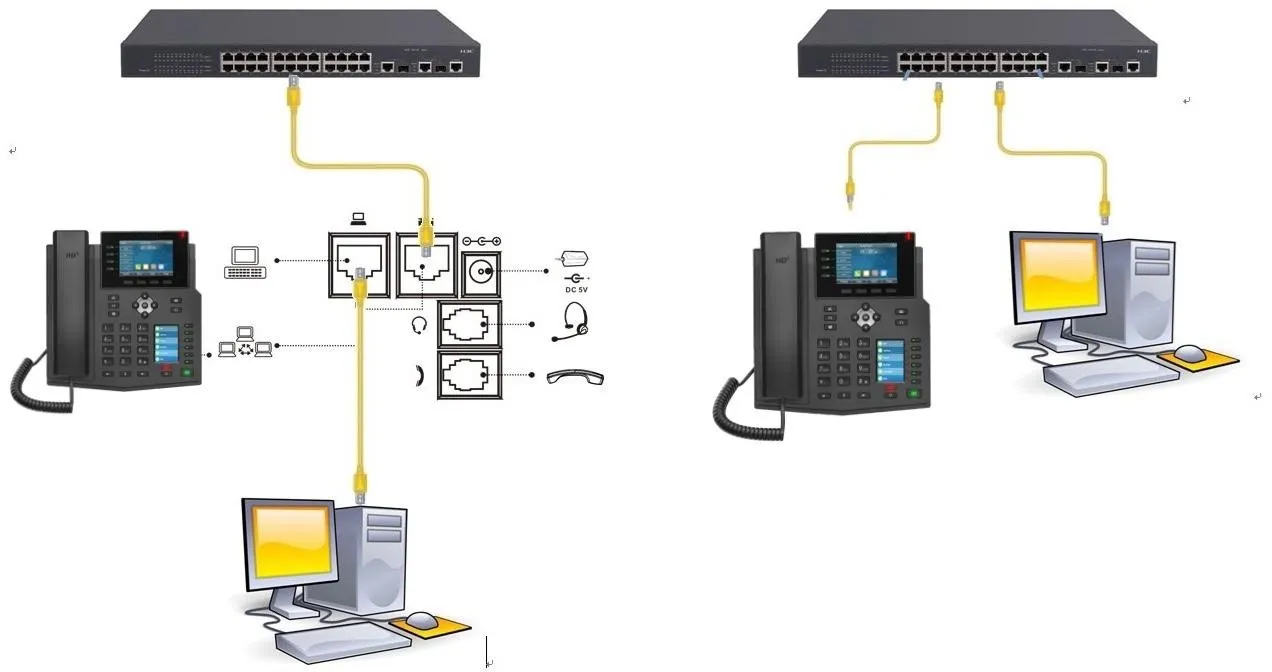
Схема подключения телефона и ПК

Схема подключения телефона и ПК

Процедура

Вход в веб-интерфейс телефона

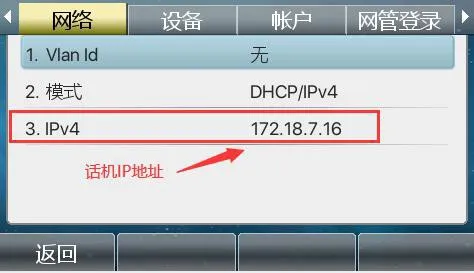
На ЖК-экране телефона перейдите в МенюСтатус, чтобы найти IP-адрес телефона.

Проверка IP-адреса телефона из меню веб-интерфейса

Затем откройте веб-браузер на ПК и введите IP-адрес телефона в адресную строку для доступа к веб-интерфейсу телефона.
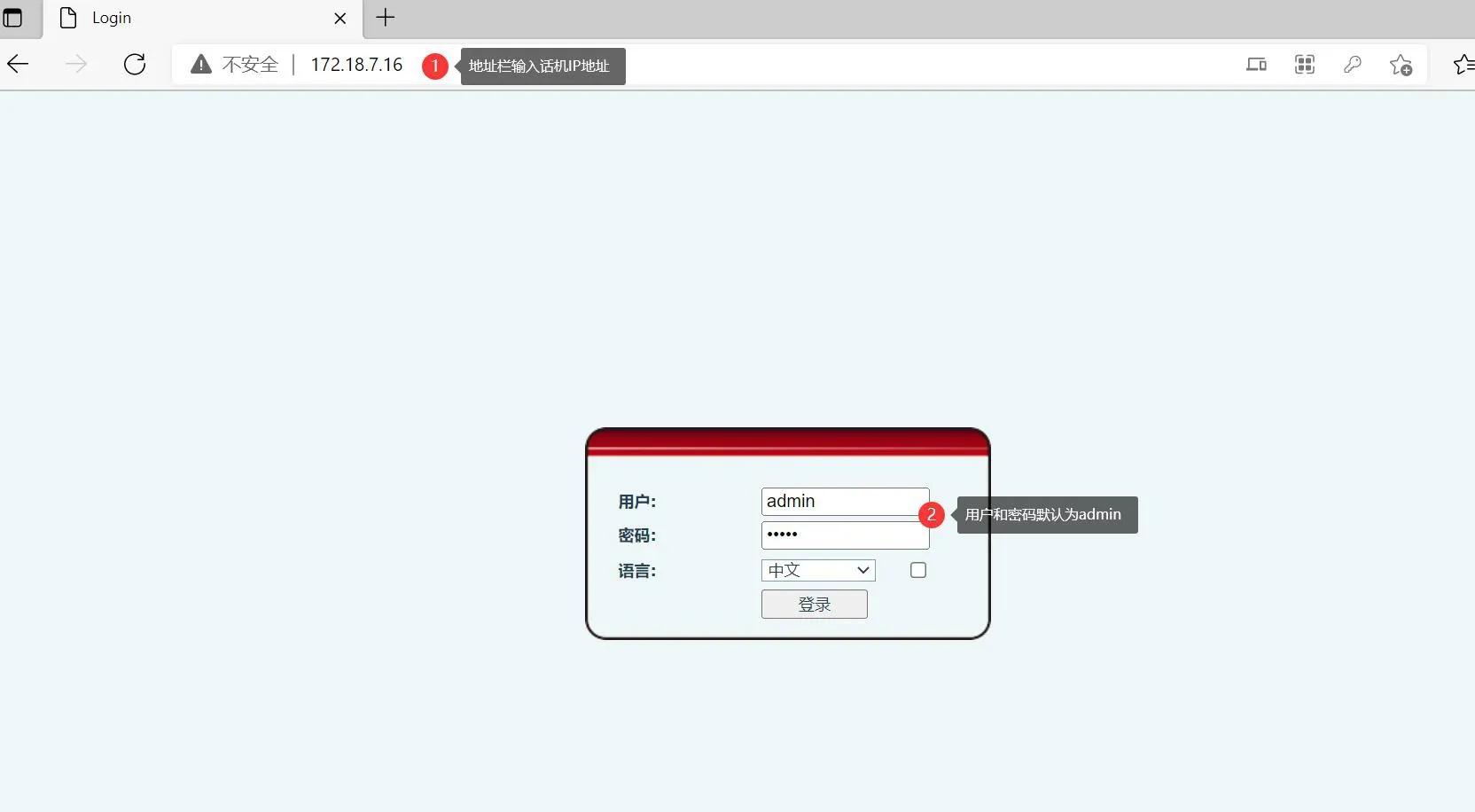
Ввод IP-адреса телефона в адресную строку браузера

Создание образца контакта

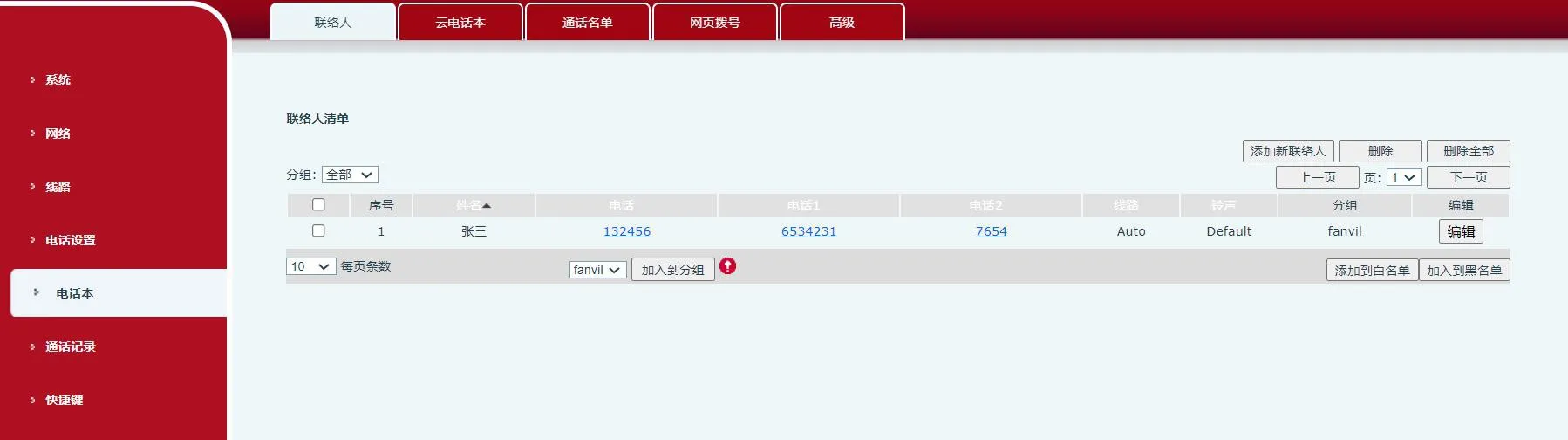
После входа в веб-интерфейс телефона перейдите в Телефонная книгаКонтактыДобавить новый контакт. Сначала создайте один образец контакта, как показано ниже.
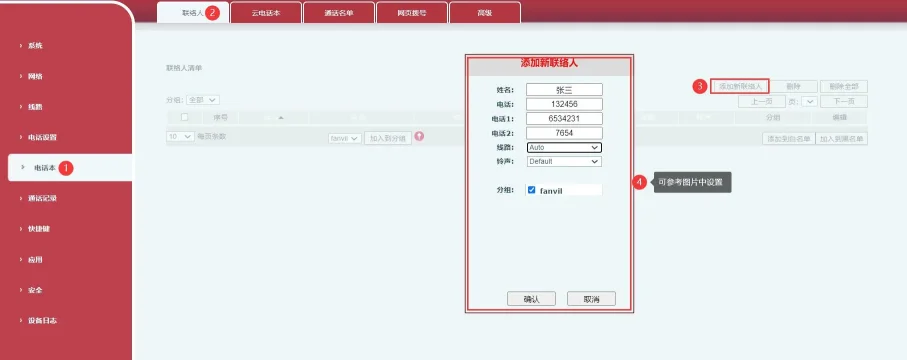
Добавление нового контакта в веб-интерфейсе телефона 

                                                                                                                                                                               Рисунок 1

Настройки нового контакта на странице управления телефоном 

                                                                                                                                                                             Рисунок 2

Создание групп контактов

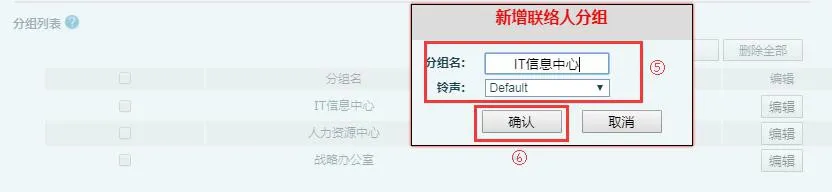
Если вашему списку контактов нужна информация о группах, создайте группы перед импортом контактов. Перейдите в Телефонная книгаДополнительноСписок группДобавить группу контактов, затем добавьте необходимые названия групп.
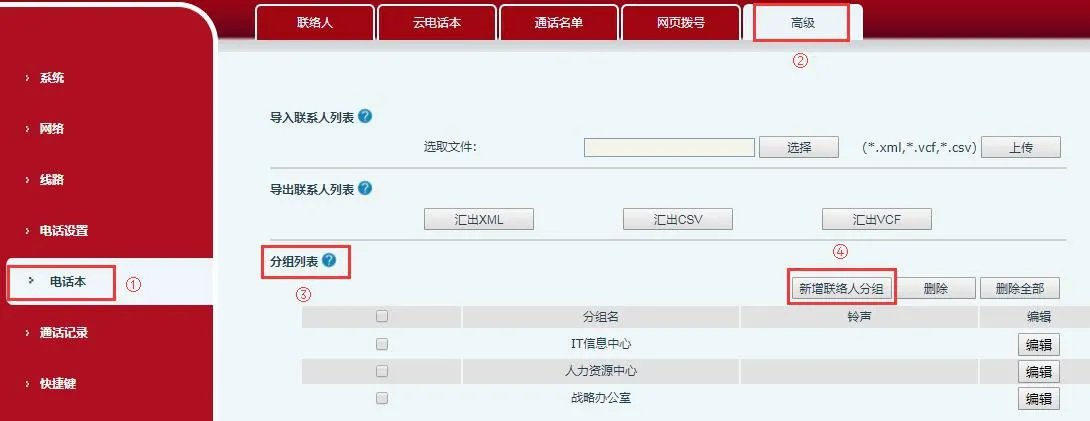
Добавление новой группы контактов в веб-интерфейсе телефона
                                                                                                                                                                          Рисунок 3

Создание групп контактов на странице управления телефоном
                                                                                                                                                                          Рисунок 4

Экспорт шаблона списка контактов

В веб-интерфейсе телефона перейдите в Телефонная книгаДополнительно. В разделе экспорта контактов нажмите Экспорт CSV. Телефон экспортирует CSV-файл контактов, обычно называемый contact.csv.

Этот экспортированный файл служит правильным шаблоном для импорта. Вы можете добавлять новые записи контактов в этот файл, но существующая структура и формат файла должны оставаться неизменными, чтобы обеспечить успешный импорт в дальнейшем.
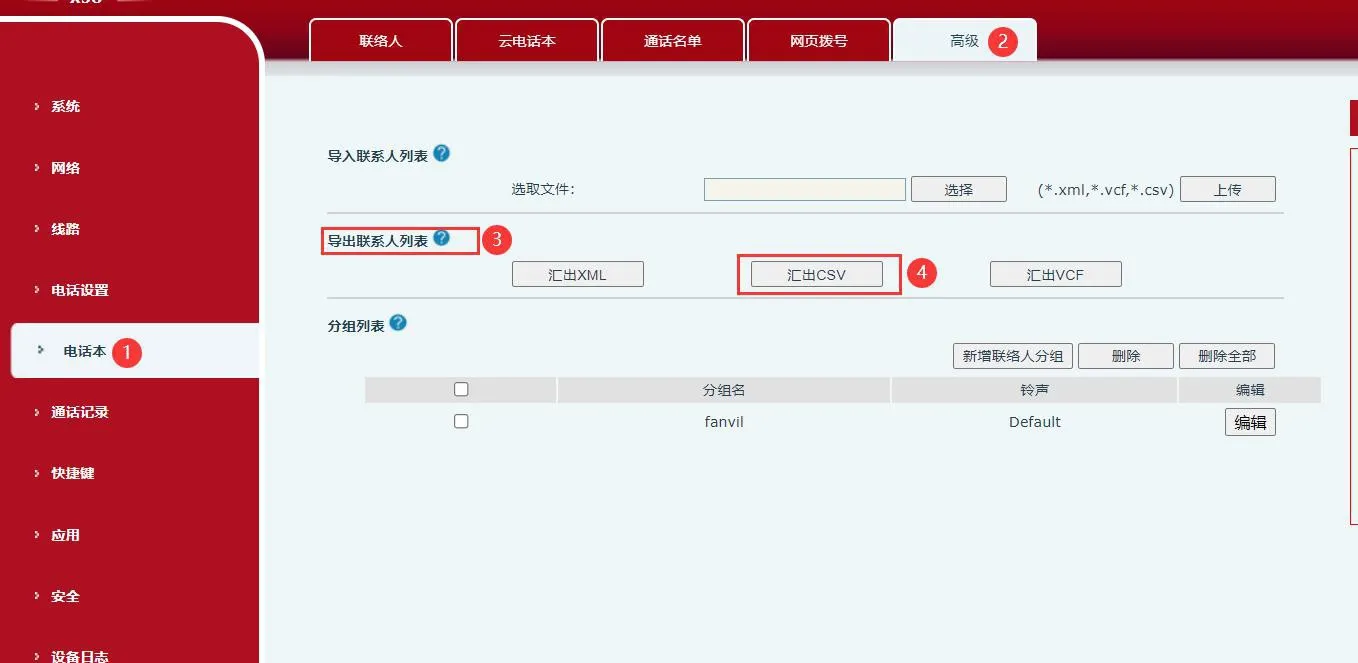
Экспорт списка контактов из веб-интерфейса телефона
                                                                                                                                                                        Рисунок 5

Редактирование контактов в электронной таблице

Вы можете редактировать CSV-файл с помощью обычных инструментов работы с электронными таблицами, таких как Excel или WPS Office. В этом примере используется WPS. Откройте экспортированный файл contact.csv и введите новую контактную информацию.

Использование полей следующее:

Столбец name используется для имени контакта.

Столбец work используется для основного рабочего номера.

Столбцы mobile и other используются для дополнительных телефонных номеров.

Столбец ring определяет мелодию звонка, назначенную этому контакту.

Столбец groups используется для назначения группы. Любое имя группы, введенное здесь, уже должно существовать на телефоне, например work или home.

После редактирования сохраните файл. Если программное обеспечение предупреждает, что некоторое форматирование может быть несовместимо, нажмите Да, чтобы продолжить.
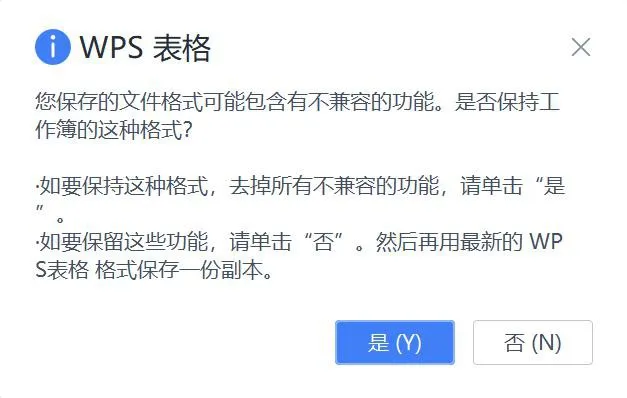
Сохранение отредактированного CSV-файла контактов

Преобразование кодировки файла телефонной книги

Если вы импортируете отредактированный файл напрямую после открытия его в Excel или WPS, имена контактов могут отображаться на телефоне как нечитаемый текст. Это происходит потому, что исходная кодировка файла может быть изменена программой для работы с электронными таблицами.

Чтобы избежать этой проблемы, откройте отредактированный файл телефонной книги в UltraEdit. В строке меню выберите ФайлСохранить как и выберите правильный формат файла или кодировку по мере необходимости.
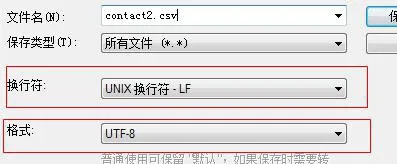
Изменение формата или кодировки файла телефонной книги

Сохраните файл как contact2.csv. Затем импортируйте этот новый файл в веб-интерфейс телефона. Список контактов должен отображаться правильно, без искаженных символов.

Импорт списка контактов

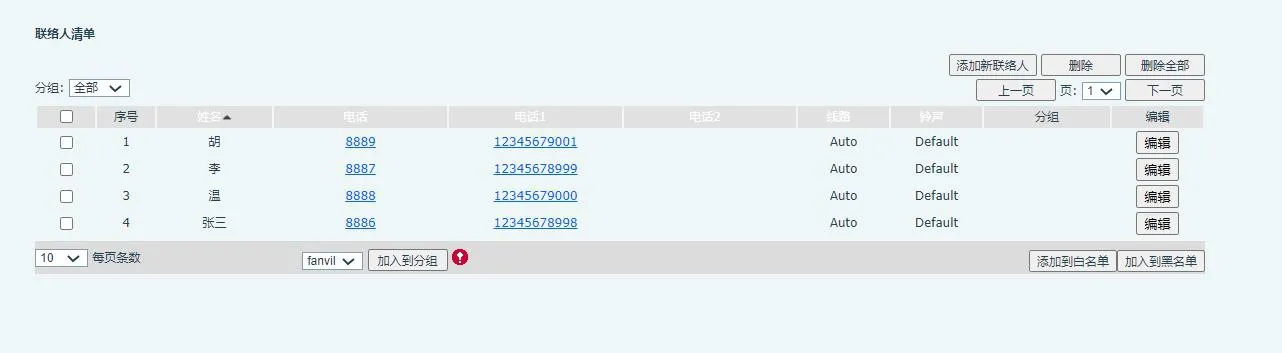
В веб-интерфейсе телефона перейдите в Телефонная книгаДополнительноИмпорт списка контактов. Выберите подготовленный файл контактов и нажмите Загрузить, чтобы завершить импорт.

Следующие изображения показывают процесс импорта и конечный результат.
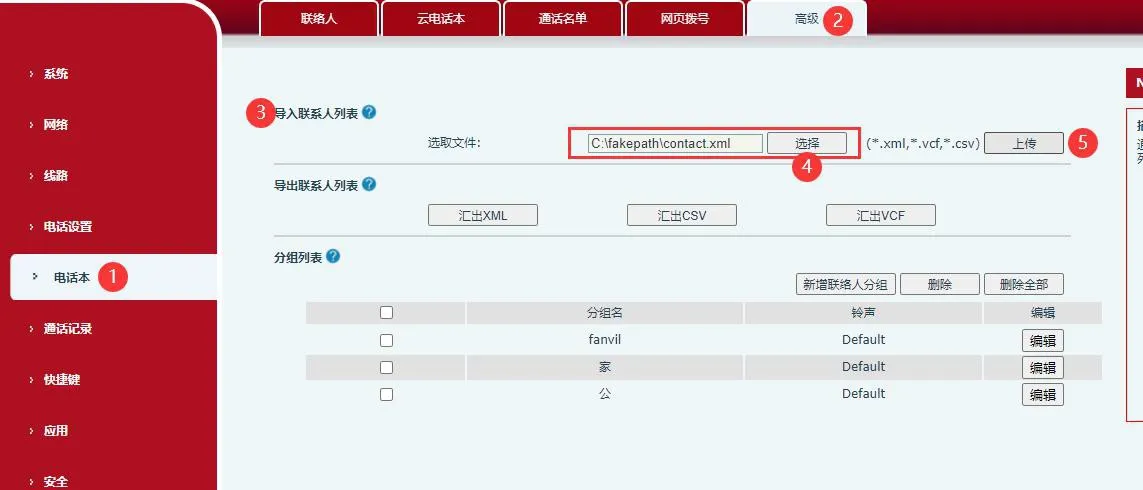
Импорт шаблона списка контактов в телефон
Импортированный список контактов отображается в веб-интерфейсе телефона

Каталог
обслуживание клиентов Телефон
We use cookie to improve your online experience. By continuing to browse this website, you agree to our use of cookie.

Cookies

This Cookie Policy explains how we use cookies and similar technologies when you access or use our website and related services. Please read this Policy together with our Terms and Conditions and Privacy Policy so that you understand how we collect, use, and protect information.

By continuing to access or use our Services, you acknowledge that cookies and similar technologies may be used as described in this Policy, subject to applicable law and your available choices.

Updates to This Cookie Policy

We may revise this Cookie Policy from time to time to reflect changes in legal requirements, technology, or our business practices. When we make updates, the revised version will be posted on this page and will become effective from the date of publication unless otherwise required by law.

Where required, we will provide additional notice or request your consent before applying material changes that affect your rights or choices.

What Are Cookies?

Cookies are small text files placed on your device when you visit a website or interact with certain online content. They help websites recognize your browser or device, remember your preferences, support essential functionality, and improve the overall user experience.

In this Cookie Policy, the term “cookies” also includes similar technologies such as pixels, tags, web beacons, and other tracking tools that perform comparable functions.

Why We Use Cookies

We use cookies to help our website function properly, remember user preferences, enhance website performance, understand how visitors interact with our pages, and support security, analytics, and marketing activities where permitted by law.

We use cookies to keep our website functional, secure, efficient, and more relevant to your browsing experience.

Categories of Cookies We Use

Strictly Necessary Cookies

These cookies are essential for the operation of the website and cannot be disabled in our systems where they are required to provide the service you request. They are typically set in response to actions such as setting privacy preferences, signing in, or submitting forms.

Without these cookies, certain parts of the website may not function correctly.

Functional Cookies

Functional cookies enable enhanced features and personalization, such as remembering your preferences, language settings, or previously selected options. These cookies may be set by us or by third-party providers whose services are integrated into our website.

If you disable these cookies, some services or features may not work as intended.

Performance and Analytics Cookies

These cookies help us understand how visitors use our website by collecting information such as traffic sources, page visits, navigation behavior, and general interaction patterns. In many cases, this information is aggregated and does not directly identify individual users.

We use this information to improve website performance, usability, and content relevance.

Targeting and Advertising Cookies

These cookies may be placed by our advertising or marketing partners to help deliver more relevant ads and measure the effectiveness of campaigns. They may use information about your browsing activity across different websites and services to build a profile of your interests.

These cookies generally do not store directly identifying personal information, but they may identify your browser or device.

First-Party and Third-Party Cookies

Some cookies are set directly by our website and are referred to as first-party cookies. Other cookies are set by third-party services, such as analytics providers, embedded content providers, or advertising partners, and are referred to as third-party cookies.

Third-party providers may use their own cookies in accordance with their own privacy and cookie policies.

Information Collected Through Cookies

Depending on the type of cookie used, the information collected may include browser type, device type, IP address, referring website, pages viewed, time spent on pages, clickstream behavior, and general usage patterns.

This information helps us maintain the website, improve performance, enhance security, and provide a better user experience.

Your Cookie Choices

You can control or disable cookies through your browser settings and, where available, through our cookie consent or preference management tools. Depending on your location, you may also have the right to accept or reject certain categories of cookies, especially those used for analytics, personalization, or advertising purposes.

Please note that blocking or deleting certain cookies may affect the availability, functionality, or performance of some parts of the website.

Restricting cookies may limit certain features and reduce the quality of your experience on the website.

Cookies in Mobile Applications

Where our mobile applications use cookie-like technologies, they are generally limited to those required for core functionality, security, and service delivery. Disabling these essential technologies may affect the normal operation of the application.

We do not use essential mobile application cookies to store unnecessary personal information.

How to Manage Cookies

Most web browsers allow you to manage cookies through browser settings. You can usually choose to block, delete, or receive alerts before cookies are stored. Because browser controls vary, please refer to your browser provider’s support documentation for details on how to manage cookie settings.

Contact Us

If you have any questions about this Cookie Policy or our use of cookies and similar technologies, please contact us at support@becke.cc .