
Руководство по быстрым клавишам SIP-внутренних телефонов: Memory Key, Line, Event Key, DTMF, URL, BLF List, multicast paging и Action URL для i51W, i52W, i53W и i56A.
В этом документе подробно описаны назначение и использование настраиваемых быстрых клавиш на внутренних телефонах серии i.
Документ применим ко всем внутренним телефонам серии i, включая i51W, i52W, i53W и i56A.
① Один внутренний телефон серии i, с PoE-коммутатором или DC-питанием для сети и питания устройства;
② Один компьютер для отладки, подключенный к тому же коммутатору, чтобы компьютер и телефон могли обмениваться данными по сети.
PoE-коммутатор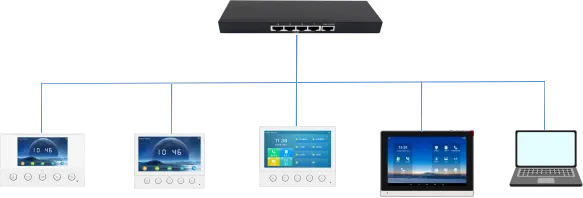
i51W i52W i53W i56A Компьютер
По функциям быстрые клавиши можно разделить на следующие основные категории:
Memory Key
Line
Event Key
DTMF
URL
BLF List Key
MCAST Paging/MCAST Listening
Action URL
XML Browser
Application
Примечание: из-за различий в моделях и системных решениях категории могут отличаться. i51W/i52W/i53W не имеют XML Browser и Application, а i51W/i52W не имеют MCAST Listening и BLF List Key.
По конкретным функциям Memory Key делится на следующие подтипы:
1. None
2. BLF related configuration
3. Presence
4. Voice Mail
5. Speed Dial
6. Intercom
7. Call Park
8. Call Forward
Поскольку i51W и i52W не имеют сенсорного экрана, доступные подтипы Memory Key и Event Key отличаются от i53W и i56A. На i51W и i52W Memory Key может быть только Speed Dial или Intercom, а Event Key — Do-not-disturb, Handfree, OK, End и Intercom.
3.1.1. BLF related configuration
Описание функции: Эта функция выполняет соответствующую операцию BLF can indicate the status of a subscribed extension and can pick up the call w и упрощает быстрые действия с SIP-линиями, вызовами, контактами или сервисами.
Параметры настройки: Тип: Memory Key
Значение: BLF related configuration / DSS value
Линия: SIP account used for outgoing calls or subscription
Подтип: BLF related configuration
Номер перехвата: optional server pickup code
Использование: Эта функция выполняет соответствующую операцию Press the configured key in standby, ringing or call status to execute the assig и упрощает быстрые действия с SIP-линиями, вызовами, контактами или сервисами.
3.1.2. Presence
Описание функции: Эта функция выполняет соответствующую операцию Presence shows line status through the indicator and can also show whether the o и упрощает быстрые действия с SIP-линиями, вызовами, контактами или сервисами.
Параметры настройки: Тип: Memory Key
Значение: Presence / DSS value
Линия: SIP account used for outgoing calls or subscription
Подтип: Presence
Номер перехвата: optional server pickup code
Использование: Эта функция выполняет соответствующую операцию Press the configured key in standby, ringing or call status to execute the assig и упрощает быстрые действия с SIP-линиями, вызовами, контактами или сервисами.
3.1.3. Voice Mail
Описание функции: Эта функция выполняет соответствующую операцию Voice Mail is used to listen to messages и упрощает быстрые действия с SIP-линиями, вызовами, контактами или сервисами.
Параметры настройки: Тип: Memory Key
Значение: Voice Mail / DSS value
Линия: SIP account used for outgoing calls or subscription
Подтип: Voice Mail
Использование: Эта функция выполняет соответствующую операцию Press the configured key in standby, ringing or call status to execute the assig и упрощает быстрые действия с SIP-линиями, вызовами, контактами или сервисами.
3.1.4. Speed Dial
Описание функции: Эта функция выполняет соответствующую операцию Speed Dial is used for frequently dialed or hard-to-remember numbers и упрощает быстрые действия с SIP-линиями, вызовами, контактами или сервисами.
Параметры настройки: Тип: Memory Key
Значение: Speed Dial / DSS value
Линия: SIP account used for outgoing calls or subscription
Подтип: Speed Dial
Использование: Эта функция выполняет соответствующую операцию Press the configured key in standby, ringing or call status to execute the assig и упрощает быстрые действия с SIP-линиями, вызовами, контактами или сервисами.
3.1.5. Intercom
Описание функции: Эта функция выполняет соответствующую операцию Intercom enables automatic answering and direct conversation with the configured и упрощает быстрые действия с SIP-линиями, вызовами, контактами или сервисами.
Параметры настройки: Тип: Memory Key
Значение: Intercom / DSS value
Линия: SIP account used for outgoing calls or subscription
Подтип: Intercom
Использование: Эта функция выполняет соответствующую операцию Press the configured key in standby, ringing or call status to execute the assig и упрощает быстрые действия с SIP-линиями, вызовами, контактами или сервисами.
3.1.6. Call Park
Описание функции: Эта функция выполняет соответствующую операцию Call Park temporarily parks a call on the server, so the user can retrieve the c и упрощает быстрые действия с SIP-линиями, вызовами, контактами или сервисами.
Параметры настройки: Тип: Memory Key
Значение: Call Park / DSS value
Линия: SIP account used for outgoing calls or subscription
Подтип: Call Park
Использование: Эта функция выполняет соответствующую операцию Press the configured key in standby, ringing or call status to execute the assig и упрощает быстрые действия с SIP-линиями, вызовами, контактами или сервисами.
3.1.7. Call Forward
Описание функции: Эта функция выполняет соответствующую операцию Call Forward transfers an incoming call to the configured destination number wit и упрощает быстрые действия с SIP-линиями, вызовами, контактами или сервисами.
Параметры настройки: Тип: Memory Key
Значение: Call Forward / DSS value
Линия: SIP account used for outgoing calls or subscription
Подтип: Call Forward
Использование: Эта функция выполняет соответствующую операцию Press the configured key in standby, ringing or call status to execute the assig и упрощает быстрые действия с SIP-линиями, вызовами, контактами или сервисами.
Нажмите клавишу Line. Если линия не зарегистрирована, телефон переходит в режим настройки линии. Если линия зарегистрирована, он переходит в режим набора, где можно ввести номер и выполнить вызов.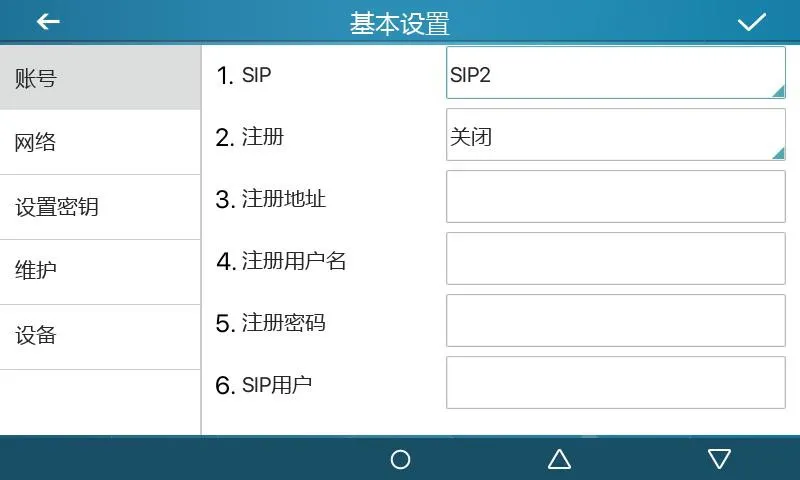
Рисунок 1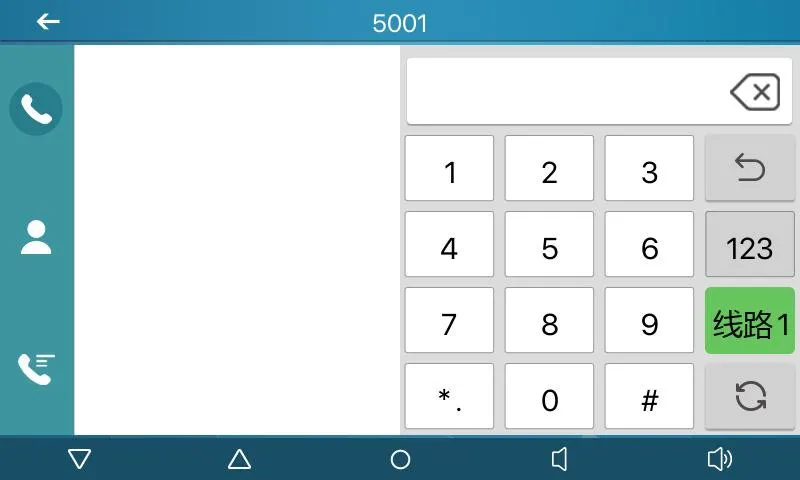
Рисунок 2
Описание функции: Клавиша настраивается как специальная функциональная клавиша через подтип. Разные подтипы имеют разные функции и способы работы.
Параметры настройки: Тип: Event Key
Подтип: selected function type
Использование:
3.3.1 None:
Нет функции.
3.3.2 Voice Mail:
Эта функция выполняет соответствующую операцию Checks voice mail information for all SIP lines and can call the mailbox of the и упрощает быстрые действия с SIP-линиями, вызовами, контактами или сервисами.
3.3.3 Do-not-disturb:
Эта функция выполняет соответствующую операцию Enables do-not-disturb for the whole device or for a selected SIP line и упрощает быстрые действия с SIP-линиями, вызовами, контактами или сервисами.
3.3.4 Call Hold:
Эта функция выполняет соответствующую операцию Places the current call on hold like a physical Hold key и упрощает быстрые действия с SIP-линиями, вызовами, контактами или сервисами.
3.3.5 Transfer:
Эта функция выполняет соответствующую операцию Transfers the current call like a Transfer key or Xfer softkey и упрощает быстрые действия с SIP-линиями, вызовами, контактами или сервисами.
3.3.6 Phonebook:
Эта функция выполняет соответствующую операцию Opens the contact directory и упрощает быстрые действия с SIP-линиями, вызовами, контактами или сервисами.
3.3.7 Redial:
Эта функция выполняет соответствующую операцию Redials the last outgoing number using the previous line и упрощает быстрые действия с SIP-линиями, вызовами, контактами или сервисами.
3.3.8 Pick up:
Эта функция выполняет соответствующую операцию Answers an incoming call that is ringing on another phone after the ringing phon и упрощает быстрые действия с SIP-линиями, вызовами, контактами или сервисами.
3.3.9 Join:
Эта функция выполняет соответствующую операцию Allows the test phone to join an existing call after entering the target phone n и упрощает быстрые действия с SIP-линиями, вызовами, контактами или сервисами.
3.3.10 Call Forward:
Эта функция выполняет соответствующую операцию Opens call forwarding settings in standby mode и упрощает быстрые действия с SIP-линиями, вызовами, контактами или сервисами.
3.3.11 Call Logs:
Эта функция выполняет соответствующую операцию Opens call history and call record information и упрощает быстрые действия с SIP-линиями, вызовами, контактами или сервисами.
3.3.12 Flash:
Эта функция выполняет соответствующую операцию Holds the current call and opens a new dialing state with dial tone и упрощает быстрые действия с SIP-линиями, вызовами, контактами или сервисами.
3.3.13 Memo:
Эта функция выполняет соответствующую операцию Opens the memo application for note management и упрощает быстрые действия с SIP-линиями, вызовами, контактами или сервисами.
3.3.14 Headset:
Эта функция выполняет соответствующую операцию Works like the physical headset key for answering and hanging up calls и упрощает быстрые действия с SIP-линиями, вызовами, контактами или сервисами.
3.3.15 Release:
Эта функция выполняет соответствующую операцию Exits the LCD menu or hangs up all calls and returns to standby и упрощает быстрые действия с SIP-линиями, вызовами, контактами или сервисами.
3.3.16 Lock phone:
Эта функция выполняет соответствующую операцию Locks the phone from standby mode и упрощает быстрые действия с SIP-линиями, вызовами, контактами или сервисами.
3.3.17 SMS:
Эта функция выполняет соответствующую операцию Opens the SMS interface for sending, receiving and browsing messages и упрощает быстрые действия с SIP-линиями, вызовами, контактами или сервисами.
3.3.18 Call Back:
Эта функция выполняет соответствующую операцию Calls back the last incoming number after off-hook и упрощает быстрые действия с SIP-линиями, вызовами, контактами или сервисами.
3.3.19 Hide DTMF:
Эта функция выполняет соответствующую операцию Opens the setting mode for DTMF hidden display и упрощает быстрые действия с SIP-линиями, вызовами, контактами или сервисами.
3.3.20 Intercom:
Эта функция выполняет соответствующую операцию Enables Intercom mode and automatic answering when no other call is active и упрощает быстрые действия с SIP-линиями, вызовами, контактами или сервисами.
3.3.21 Group Listening:
Эта функция выполняет соответствующую операцию Enables group listening during handset or headset calls; audio is played, while и упрощает быстрые действия с SIP-линиями, вызовами, контактами или сервисами.
3.3.22 Prefix:
Эта функция выполняет соответствующую операцию Adds the configured outside-line prefix after off-hook, so users do not need to и упрощает быстрые действия с SIP-линиями, вызовами, контактами или сервисами.
3.3.23 Hot Desking:
Эта функция выполняет соответствующую операцию Clears all SIP configurations after the configured DSS key is pressed and OK is и упрощает быстрые действия с SIP-линиями, вызовами, контактами или сервисами.
3.3.24 Agent:
Эта функция выполняет соответствующую операцию Opens the Agent interface и упрощает быстрые действия с SIP-линиями, вызовами, контактами или сервисами.
3.3.25 End:
Эта функция выполняет соответствующую операцию Performs the End function on the call interface и упрощает быстрые действия с SIP-линиями, вызовами, контактами или сервисами.
3.3.26 Disposition:
Эта функция выполняет соответствующую операцию Broadsoft Call Center function that sends Disposition Code Info during and after и упрощает быстрые действия с SIP-линиями, вызовами, контактами или сервисами.
3.3.27 Escalate:
Эта функция выполняет соответствующую операцию Broadsoft Call Center function that sends SIP Info and selects a Supervisor auto и упрощает быстрые действия с SIP-линиями, вызовами, контактами или сервисами.
3.3.28 Trace:
Эта функция выполняет соответствующую операцию Broadsoft function similar to Disposition, supporting information sending during и упрощает быстрые действия с SIP-линиями, вызовами, контактами или сервисами.
3.3.29 Handfree:
Эта функция выполняет соответствующую операцию Enters hands-free mode и упрощает быстрые действия с SIP-линиями, вызовами, контактами или сервисами.
3.3.30 Answer Key:
Эта функция выполняет соответствующую операцию Answers the incoming call и упрощает быстрые действия с SIP-линиями, вызовами, контактами или сервисами.
3.3.31 Private Hold:
Эта функция выполняет соответствующую операцию Broadsoft function that prevents other users from retrieving the held call и упрощает быстрые действия с SIP-линиями, вызовами, контактами или сервисами.
3.3.32 Local Contacts:
Эта функция выполняет соответствующую операцию Opens the local contacts interface и упрощает быстрые действия с SIP-линиями, вызовами, контактами или сервисами.
3.3.33 LDAP Group:
Эта функция выполняет соответствующую операцию Accesses the LDAP network phonebook when LDAP phonebook is enabled и упрощает быстрые действия с SIP-линиями, вызовами, контактами или сервисами.
3.3.34 XML Group:
Эта функция выполняет соответствующую операцию Accesses the selected XML network phonebook when XML phonebook is enabled и упрощает быстрые действия с SIP-линиями, вызовами, контактами или сервисами.
3.3.35 Broadsoft Group:
Эта функция выполняет соответствующую операцию Accesses the Broadsoft network phonebook when it is enabled и упрощает быстрые действия с SIP-линиями, вызовами, контактами или сервисами.
3.3.36 Record:
Эта функция выполняет соответствующую операцию Starts call recording when the phone has been configured for recording и упрощает быстрые действия с SIP-линиями, вызовами, контактами или сервисами.
3.3.37 Auto Headset:
Эта функция выполняет соответствующую операцию Enables or disables headset answering; the DSS key stays steady green и упрощает быстрые действия с SIP-линиями, вызовами, контактами или сервисами.
Описание функции: Используется для быстрого дополнительного набора без запоминания последовательности. Во время вызова нажмите эту клавишу, чтобы отправить заданную последовательность удаленной стороне.
Параметры настройки: Тип: DTMF
Значение: DTMF secondary dialing key sequence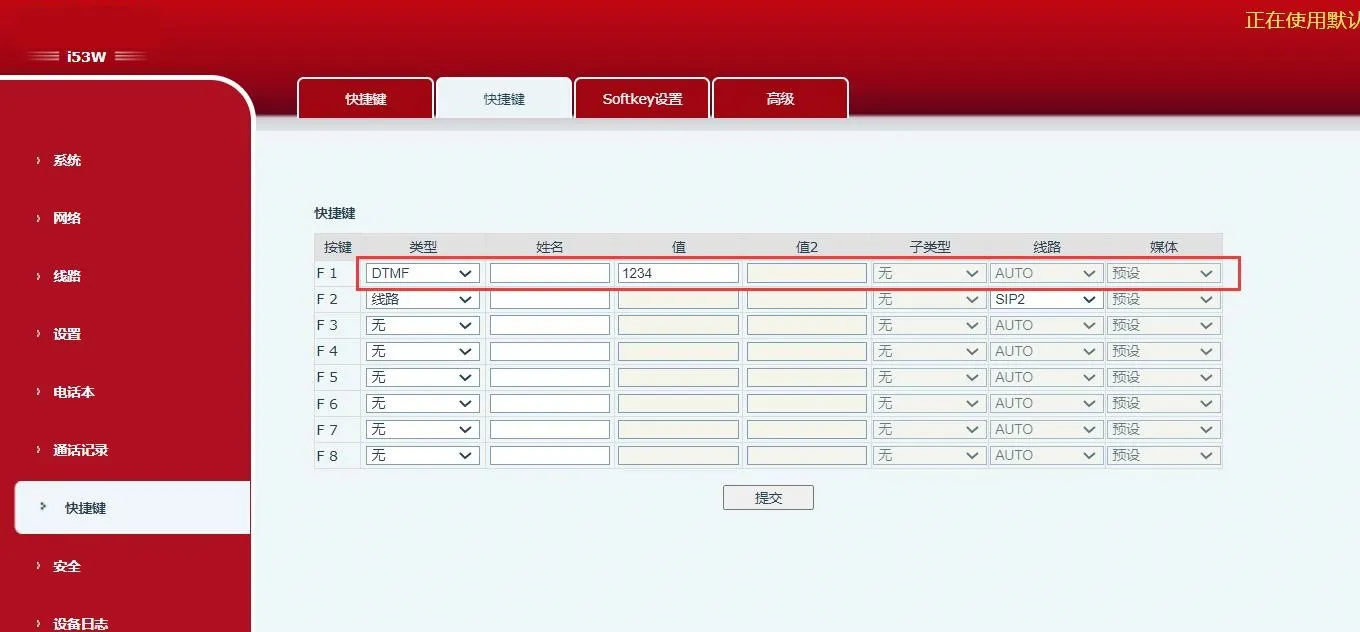 Рисунок 3
Описание функции: Нажмите эту клавишу для прямого доступа к настроенному удаленному URL, если он действителен.
Параметры настройки: Тип: URL
Значение: complete remote URL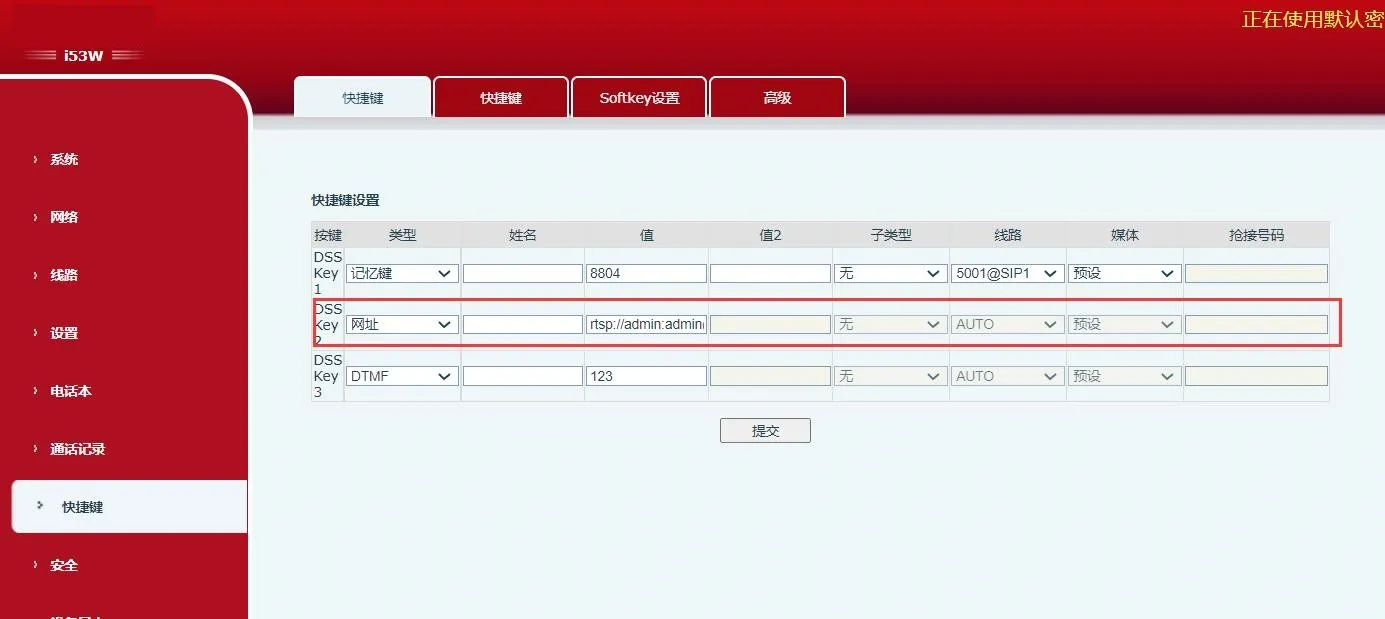 Рисунок 4
Описание функции: Функция работает совместно с сервером. Обычный BLF использует один Subscribe для каждого номера. BLF List Key группирует номера на сервере, подписывается по URL группы, анализирует Notify и отображает состояние на LED клавиши.
Параметры настройки: Тип: BLF List Key
Использование: server automatically delivers subscribed number list to DSS keys.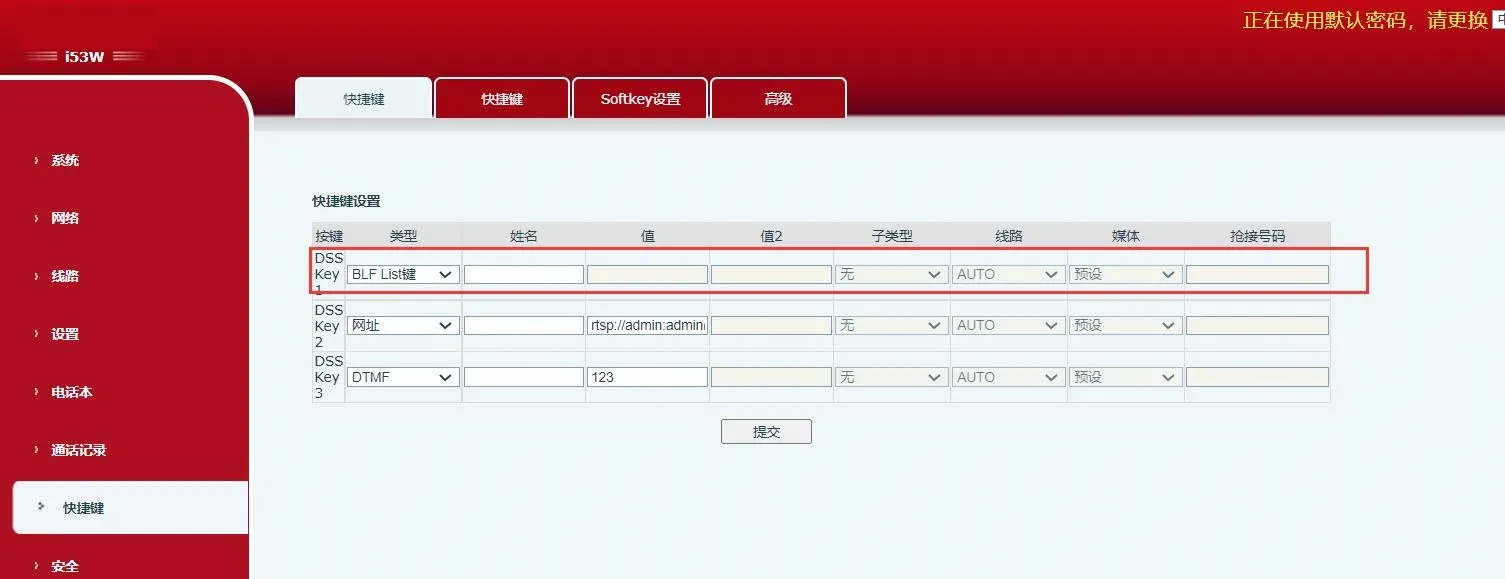 Рисунок 5
Описание функции: После настройки multicast-адреса и аудиокодека нажмите эту клавишу для отправки multicast RTP-потока. Нажмите снова, чтобы завершить multicast и положить трубку.
Параметры настройки: Тип: MCAST Paging / MCAST Listening
Значение: multicast listening address and port
Подтип: RTP audio codec used by sender and receiver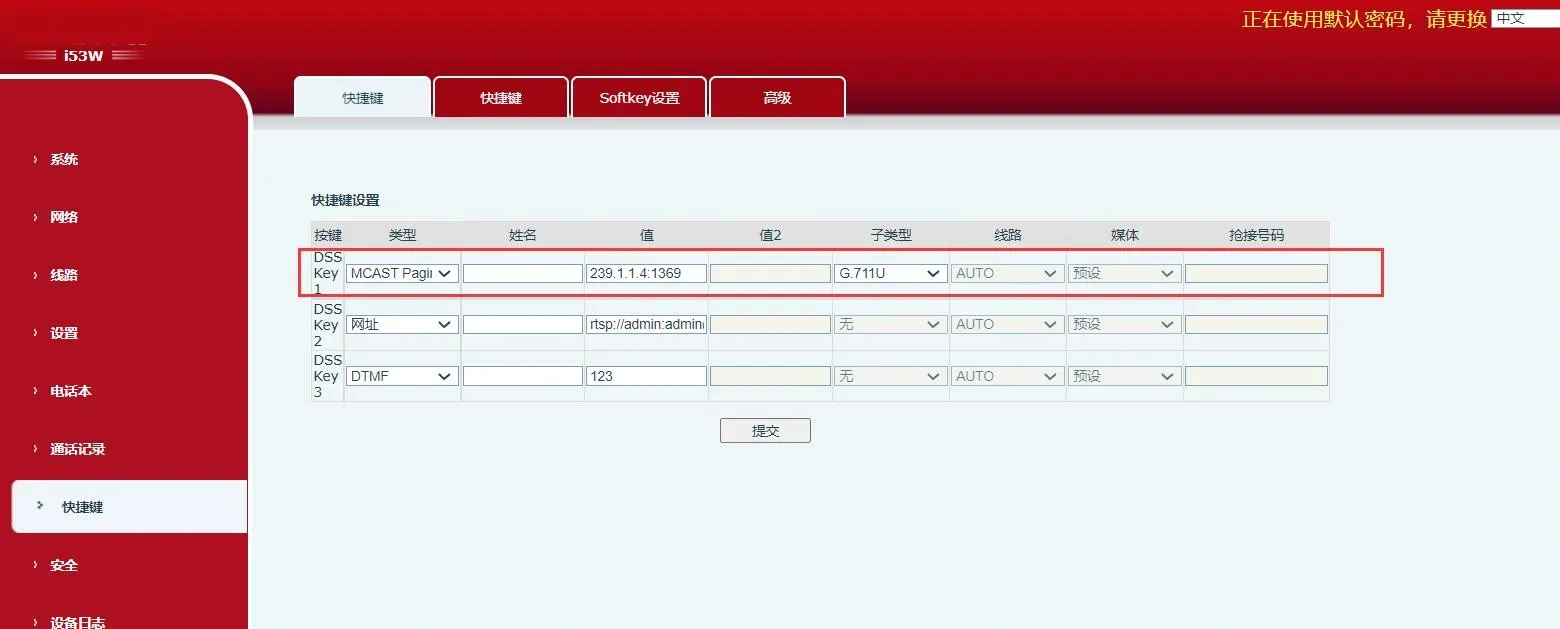
Рисунок 6
Описание функции: Настроенный URL поддерживает переменные в формате ¥. При нажатии DSS-клавиши система инициирует HTTP GET или POST запрос.
Параметры настройки: Тип: Action URL
Значение: valid URL
Подтип: POST or GET