
Инструкция по прямому IP-набору для контроля доступа

Введение

Обзор

Если устройства контроля доступа находятся в одной взаимосвязанной локальной сети и не зарегистрированы в среде PBX, можно использовать функцию прямого IP-набора для внутренней связи между устройствами.

Поддерживаемые модели

BHP-SOS10/BHP-SOS10V/BHP-SOS10D/BHP-SOS12/BHP-SOS16/BHP-SOS16V/i18S/i20S/i23S/i30/i31S/ i32V/i33V/i33VF/i61/i62/i63/i64

Необходимые инструменты и подготовка

① Один i20S и один телефон (X7A), один POE-коммутатор (или источник питания DC), подключите устройства к коммутатору.
② Один компьютер для отладки, подключенный к коммутатору, чтобы обеспечить сетевую связь между компьютером и телефоном.

Схема подключения устройства и компьютера

Подключите i20S/i52W/i53W к коммутатору и подключите компьютер к тому же коммутатору, что и устройство. Убедитесь, что сеть между компьютером и устройством взаимно доступна. Схема подключения показана ниже:
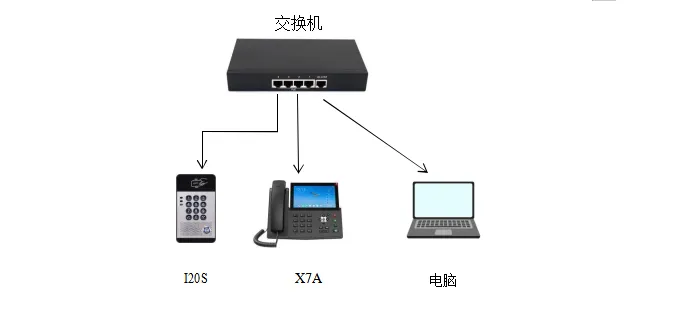
Схема подключения устройства и компьютера
            Схема подключения устройства и компьютера

Метод настройки

Вызов по быстрой клавише

BHP-SOS10/BHP-SOS10V/BHP-SOS10D/BHP-SOS12/BHP-SOS16/BHP-SOS16V/i18S/i32V/i33V/i33VF/i61/i62/i63/i64
i64: в режиме ожидания удерживайте клавишу быстрого набора 10 секунд. Звуковой сигнал будет продолжаться 5 секунд. Нажмите клавишу быстрого набора один раз в течение 5 секунд; сигнал остановится, и устройство автоматически сообщит IP-адрес.
i20S/i23S/i30/i31S: удерживайте клавишу # на устройстве 3 секунды в течение 30 секунд после включения питания. Устройство голосом автоматически воспроизведет локальный IP-адрес.
Войдите в веб-интерфейс устройства. В разделе Быстрая клавиша---Быстрая клавиша---Настройка быстрой клавиши заполните информацию и отправьте. Тип выберите “Клавиша памяти”, имя можно задать самостоятельно, в поле значения укажите IP удаленного устройства, тип выберите “Быстрый набор”.
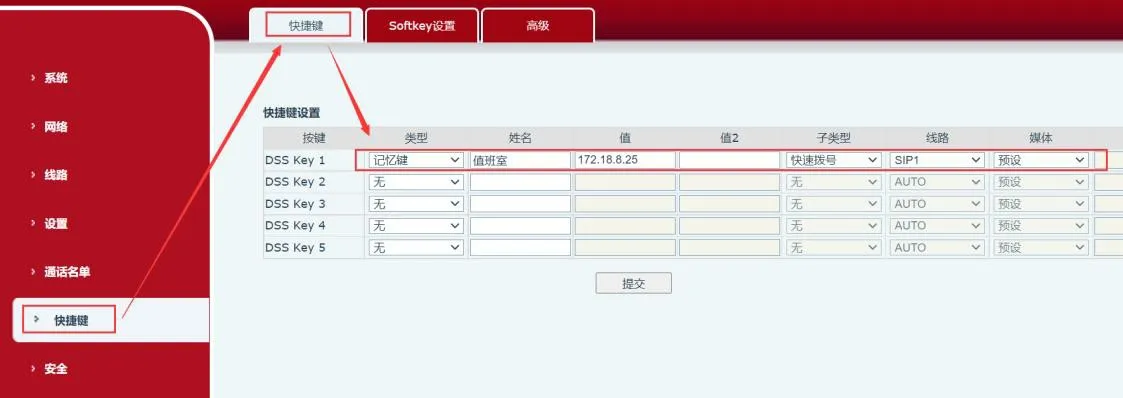
Интерфейс настройки быстрой клавиши

Ручной набор

Применимо к: i20S/i23S/i30/i31S/i32V/i33V/i33VF/i64
Введите IP-адрес на клавиатуре контроля доступа для вызова. Например, 172.18.8.23 вызывает 172.18.8.5, где “.” заменяется клавишей “*”.

Правила набора

Для использования правил набора необходимо настроить их на веб-странице устройства. Ниже приведены подробные шаги настройки.
Вход в веб-интерфейс: введите полученный IP-адрес в браузере, затем введите имя пользователя и пароль (по умолчанию admin).
После входа перейдите в “Линия”---“Dial Peer”---“Добавить Dial Peer” и настройте, как показано ниже:
① Номер: пользовательский; введенный здесь номер будет использоваться вместо исходного номера для вызова;
② Назначение: адрес, который нужно вызвать. Можно ввести IP-адрес или SIP-аккаунт. При использовании SIP-аккаунта требуется регистрация; в примере используется IP-адрес;
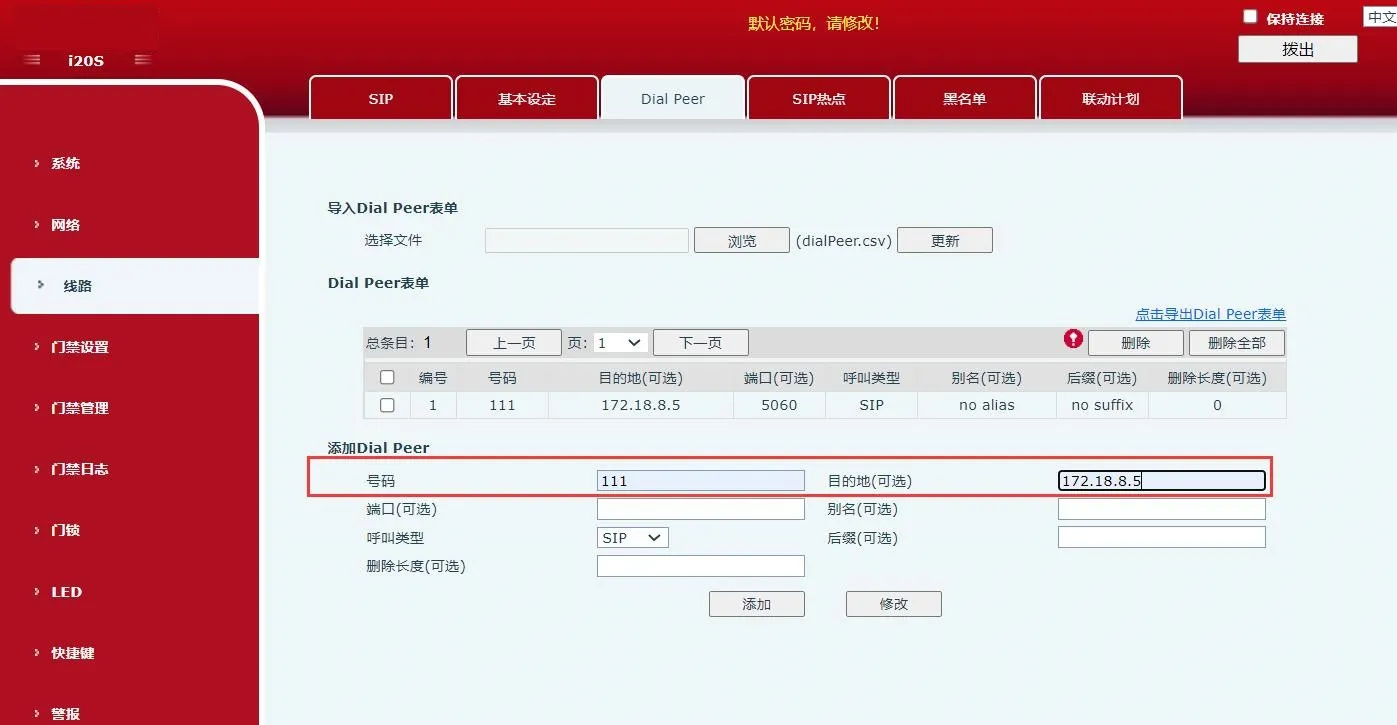
Схема добавления правила набора        Схема добавления правила набора

1. В “Настройки контроля доступа”---“Функциональные настройки” выполните настройку, как показано ниже. В “Общие настройки” выполните следующие действия:
① Установите “Режим клавиш” на “Набор и ввод пароля”: ввод с клавиш может использоваться для набора и ввода пароля;
② Установите “Режим ввода по умолчанию” на “Пароль”: по умолчанию ввод с клавиш используется только для проверки пароля;
В разделе “Настройки программируемых клавиш” выполните следующие настройки:
Для “Клавиша *” в состоянии ожидания выберите “Переключение режима ввода”, а в поле “Набор” выберите “Исходящий номер”;
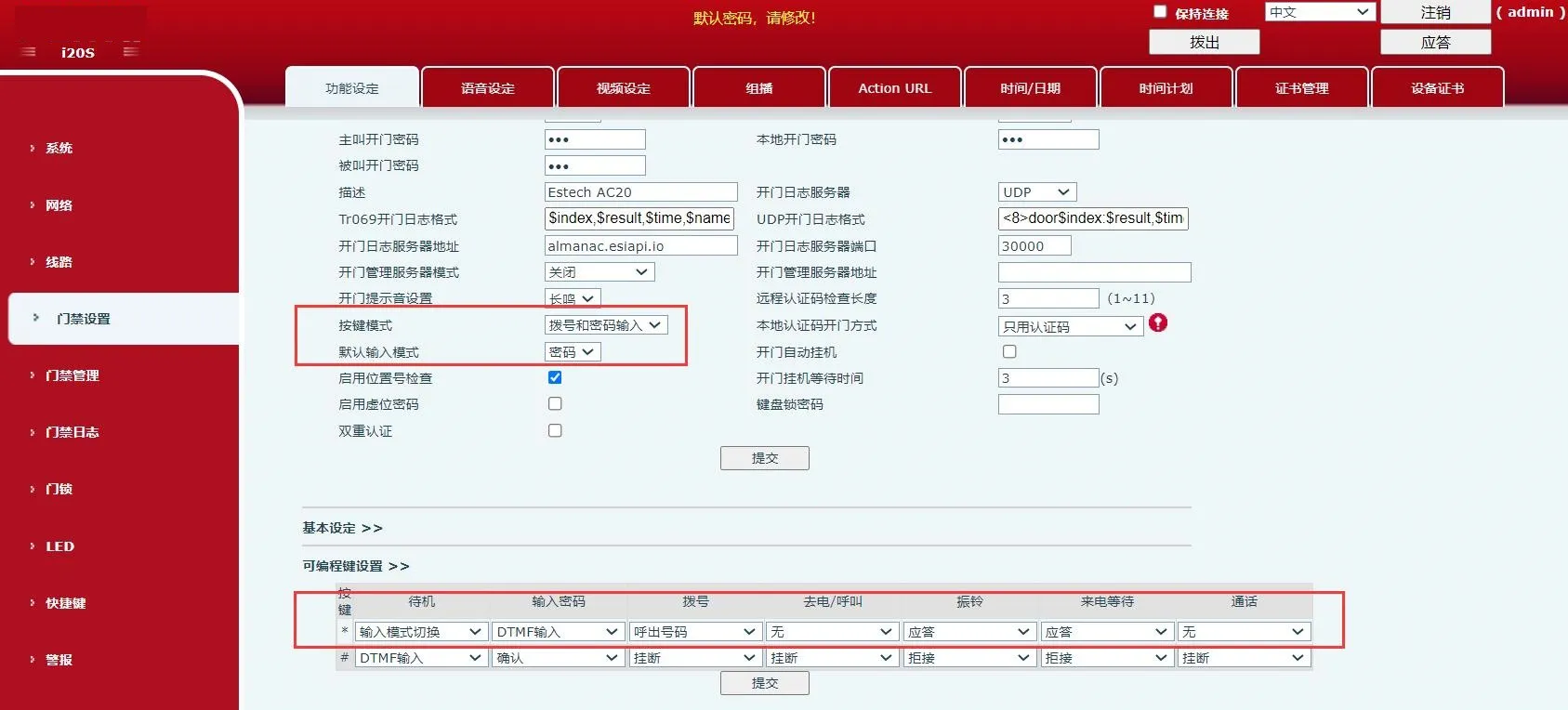
Схема настройки режима клавиш и программируемых клавиш        Схема настройки режима клавиш и программируемых клавиш

2. В “Настройки контроля доступа”---“Функциональные настройки”---“Базовые настройки” снимите флажок “Набор фиксированной длины”, как показано ниже;
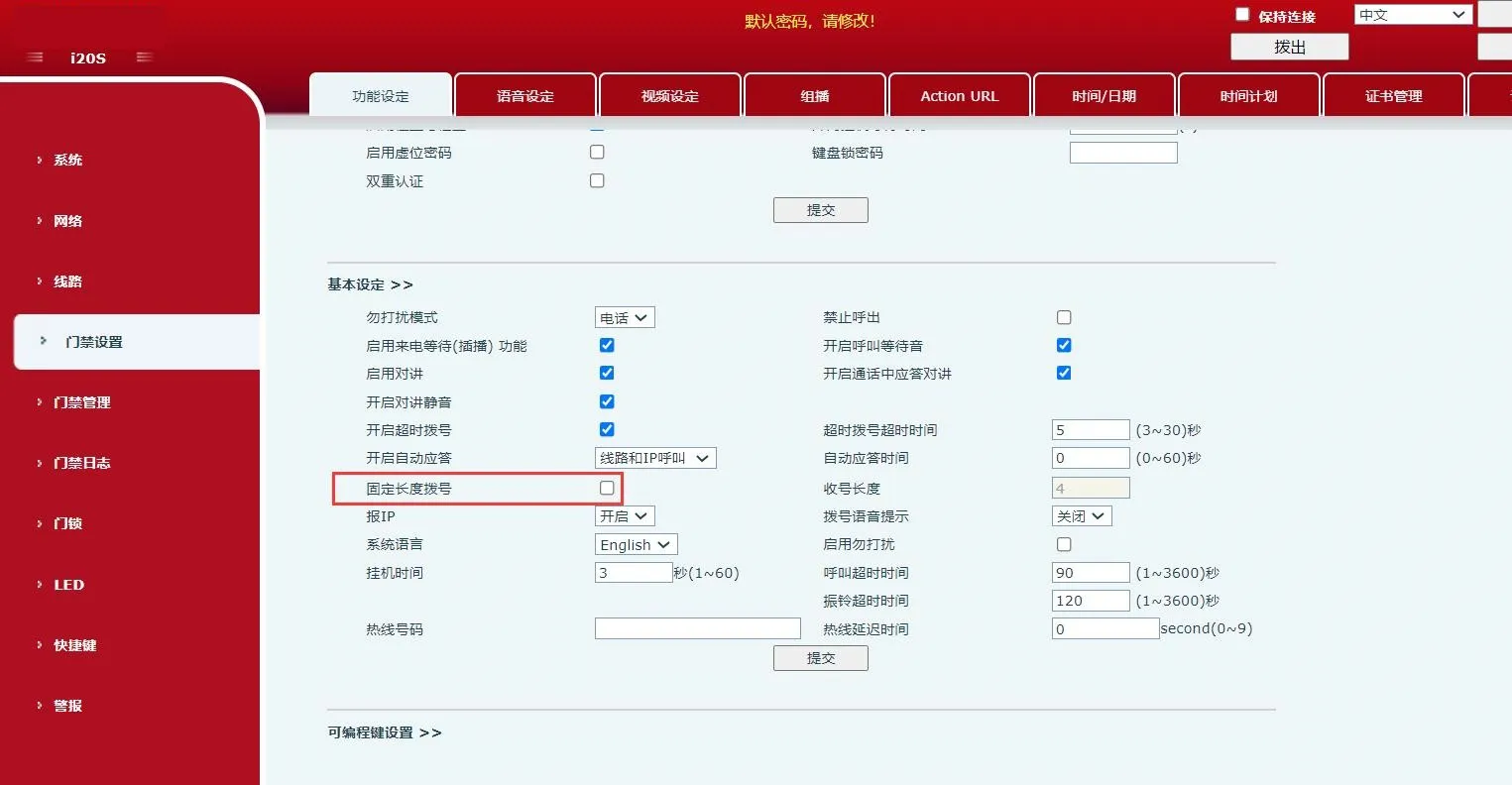
Схема отключения набора фиксированной длины
        Схема отключения набора фиксированной длины

3. После выполнения указанных настроек введите “*пользовательский номер*” на клавиатуре устройства для немедленного вызова. Также можно ввести “*пользовательский номер” и подождать 3 секунды, после чего устройство выполнит вызов автоматически. В этом примере введите “*111*” или “*111”.
Примечания:
Отключите строгую проверку UA на вызываемой стороне, чтобы устройство могло принимать входящие вызовы.
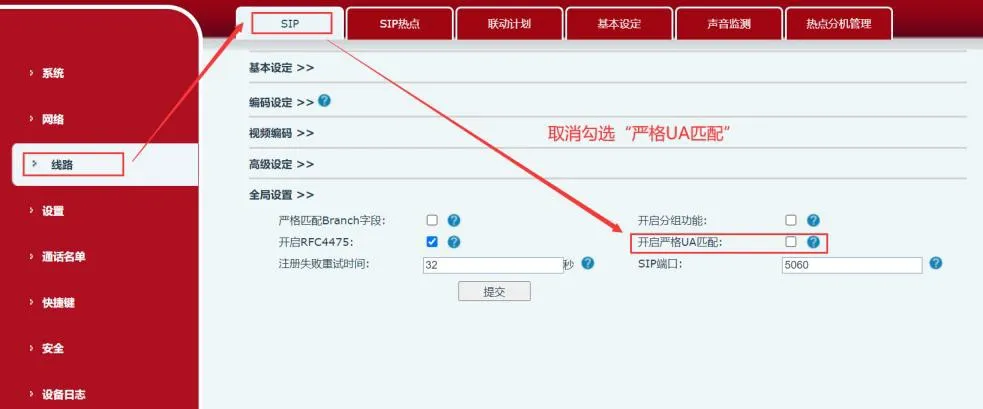
Disable strict UA matching diagram
Включите разрешение исходящих вызовов без регистрации, чтобы устройство могло звонить без регистрации.
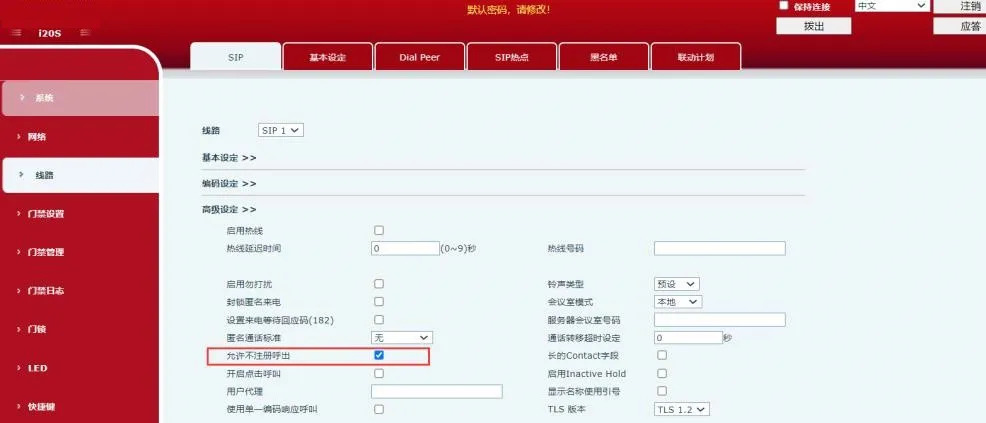

Enable unregistered outbound calling diagram

Каталог
обслуживание клиентов Телефон
We use cookie to improve your online experience. By continuing to browse this website, you agree to our use of cookie.

Cookies

This Cookie Policy explains how we use cookies and similar technologies when you access or use our website and related services. Please read this Policy together with our Terms and Conditions and Privacy Policy so that you understand how we collect, use, and protect information.

By continuing to access or use our Services, you acknowledge that cookies and similar technologies may be used as described in this Policy, subject to applicable law and your available choices.

Updates to This Cookie Policy

We may revise this Cookie Policy from time to time to reflect changes in legal requirements, technology, or our business practices. When we make updates, the revised version will be posted on this page and will become effective from the date of publication unless otherwise required by law.

Where required, we will provide additional notice or request your consent before applying material changes that affect your rights or choices.

What Are Cookies?

Cookies are small text files placed on your device when you visit a website or interact with certain online content. They help websites recognize your browser or device, remember your preferences, support essential functionality, and improve the overall user experience.

In this Cookie Policy, the term “cookies” also includes similar technologies such as pixels, tags, web beacons, and other tracking tools that perform comparable functions.

Why We Use Cookies

We use cookies to help our website function properly, remember user preferences, enhance website performance, understand how visitors interact with our pages, and support security, analytics, and marketing activities where permitted by law.

We use cookies to keep our website functional, secure, efficient, and more relevant to your browsing experience.

Categories of Cookies We Use

Strictly Necessary Cookies

These cookies are essential for the operation of the website and cannot be disabled in our systems where they are required to provide the service you request. They are typically set in response to actions such as setting privacy preferences, signing in, or submitting forms.

Without these cookies, certain parts of the website may not function correctly.

Functional Cookies

Functional cookies enable enhanced features and personalization, such as remembering your preferences, language settings, or previously selected options. These cookies may be set by us or by third-party providers whose services are integrated into our website.

If you disable these cookies, some services or features may not work as intended.

Performance and Analytics Cookies

These cookies help us understand how visitors use our website by collecting information such as traffic sources, page visits, navigation behavior, and general interaction patterns. In many cases, this information is aggregated and does not directly identify individual users.

We use this information to improve website performance, usability, and content relevance.

Targeting and Advertising Cookies

These cookies may be placed by our advertising or marketing partners to help deliver more relevant ads and measure the effectiveness of campaigns. They may use information about your browsing activity across different websites and services to build a profile of your interests.

These cookies generally do not store directly identifying personal information, but they may identify your browser or device.

First-Party and Third-Party Cookies

Some cookies are set directly by our website and are referred to as first-party cookies. Other cookies are set by third-party services, such as analytics providers, embedded content providers, or advertising partners, and are referred to as third-party cookies.

Third-party providers may use their own cookies in accordance with their own privacy and cookie policies.

Information Collected Through Cookies

Depending on the type of cookie used, the information collected may include browser type, device type, IP address, referring website, pages viewed, time spent on pages, clickstream behavior, and general usage patterns.

This information helps us maintain the website, improve performance, enhance security, and provide a better user experience.

Your Cookie Choices

You can control or disable cookies through your browser settings and, where available, through our cookie consent or preference management tools. Depending on your location, you may also have the right to accept or reject certain categories of cookies, especially those used for analytics, personalization, or advertising purposes.

Please note that blocking or deleting certain cookies may affect the availability, functionality, or performance of some parts of the website.

Restricting cookies may limit certain features and reduce the quality of your experience on the website.

Cookies in Mobile Applications

Where our mobile applications use cookie-like technologies, they are generally limited to those required for core functionality, security, and service delivery. Disabling these essential technologies may affect the normal operation of the application.

We do not use essential mobile application cookies to store unnecessary personal information.

How to Manage Cookies

Most web browsers allow you to manage cookies through browser settings. You can usually choose to block, delete, or receive alerts before cookies are stored. Because browser controls vary, please refer to your browser provider’s support documentation for details on how to manage cookie settings.

Contact Us

If you have any questions about this Cookie Policy or our use of cookies and similar technologies, please contact us at support@becke.cc .