Как подключить контроль доступа к электрозамку?

Введение

Обзор

В этом документе описано, как подключить устройство контроля доступа к электрозамку. Если пусковой ток электрозамка меньше 12V/500mA, питание может подаваться от устройства контроля доступа; это режим внутреннего питания. Если пусковой ток электрозамка превышает 12V/500mA, устройство контроля доступа используется только как управляющий выход короткого замыкания, а питание должно обеспечиваться самим замком или внешним источником; это режим внешнего питания. Эти два режима управляются перемычкой JP1. Конкретный способ подключения можно выполнить согласно данному документу.

Поддерживаемые модели

Серия контроля доступа

Целевая аудитория

Этот документ предназначен для всех пользователей, которые используют функцию подключения электрозамка к устройству контроля доступа.

Руководство по эксплуатации

Что такое замки Fail-safe и Fail-secure

Fail-safe: электрозамок, который открывает дверь при отключении питания и запирается при подаче питания
Fail-secure: электрозамок, который закрывает дверь при отключении питания и отпирается при подаче питания
Замок Fail-safe: при отключении питания или неисправности электрозамок fail-safe автоматически разблокируется, чтобы люди могли покинуть опасную зону. Поэтому такие замки называют “безопасными”: они безопасны для людей, а не для помещения.
Замки Fail-safe обычно используются на входах и выходах, например на дверях офисов или холлов.

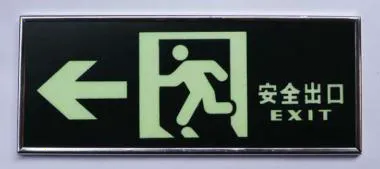
Замок Fail-safeЗамок Fail-secure
Замок Fail-secure: при отключении питания замок Fail-secure остается заблокированным.
Замки Fail-secure используются в сценариях контроля доступа с высокими требованиями к защите имущества, например в хранилищах и IT-комнатах. Их также можно использовать на противопожарных дверях или дверях лестничных клеток. В случае пожара эти двери останутся закрытыми, чтобы изолировать часть пространства и предотвратить распространение огня.
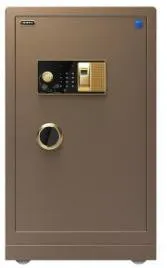
           Замок Fail-secure для хранилища

Как определить режим работы электрозамка

Устройства контроля доступа и видеоустройства Becke поддерживают два режима питания: внутреннее питание и внешнее питание. По умолчанию используется режим внешнего питания.
Режим внутреннего питания: если пусковой ток электронного замка меньше 12V / 500mA, можно использовать режим внутреннего питания, а интерфейс замка выдает 12V DC.
Режим внешнего питания: если пусковой ток электронного замка превышает 12V / 500mA, требуется режим внешнего управления, а интерфейс замка работает как управляющий выход короткого замыкания.
Внимание:
1) Значение 500mA включает мгновенный пусковой ток. Обычно мгновенный пусковой ток выше нормального рабочего тока. Если подключить электрозамок более 500mA, устройство может перезагрузиться при попытке открыть замок из-за защиты от перегрузки по току.
2) В режиме внутреннего питания электрозамок нельзя подключать к внешнему источнику питания. При ошибочном подключении может сгореть выходное реле.
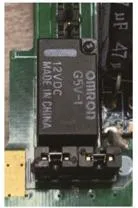
           БатареяРежим питания

Меры предосторожности перед подключением

Перед подключением обратите внимание:
1) Определите тип электрозамка: fail-safe или fail-secure
2) Уточните характеристики электрозамка и проверьте, меньше ли пусковой ток 12V / 500mA;
3) Начните подключение

Режим внутреннего питания

Step1. Проверьте характеристики электрозамка и убедитесь, что рабочее напряжение составляет 12V, а максимальный ток — 500mA.
Step2. Проверьте, относится ли электрозамок к типу fail-secure или fail-safe. Если нет, режим внутреннего питания использовать нельзя.
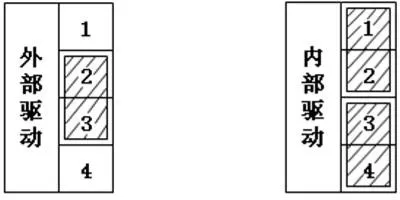
Step3. Убедитесь, что перемычка JP1 подключена: соедините pin1 и pin2, а также pin3 и pin4.
Step4. В зависимости от типа замка подключите электрозамок к интерфейсу COM-NC или COM-NO устройства контроля доступа.
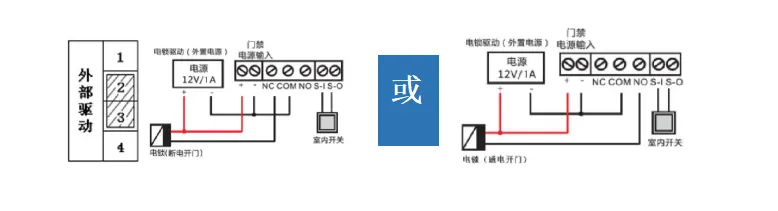
Схема подключения в режиме внутреннего питания
Преимущества режима внутреннего питания:
Место установки обычно находится рядом с дверью, где количество интерфейсов ограничено, и режим внутреннего питания не требует внешнего источника. Такой способ упрощает монтаж и снижает стоимость.
Внимание: i33V / i32V поддерживают режим внутреннего питания только на выходе короткого замыкания 1.

Режим внешнего питания

Step1. Проверьте характеристики электрозамка и убедитесь, что максимальное напряжение и ток соответствуют характеристикам реле устройства контроля доступа.

Параметры напряжения устройства
Step2. Проверьте подключение JP1: соедините pin2 и pin3, а pin1 и pin4 оставьте свободными.
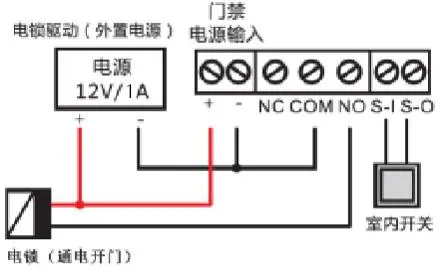
Step3. При использовании пассивного режима NC-COM / NO-COM работает как переключатель ON / OFF между замком и внешним источником питания.
1) Подключите положительный полюс внешнего источника питания к положительному полюсу электронного замка;
2) Подключите отрицательный полюс внешнего источника питания к порту COM устройства контроля доступа
3) В зависимости от типа замка подключите отрицательный полюс электронного замка к порту NC или NO устройства контроля доступа.
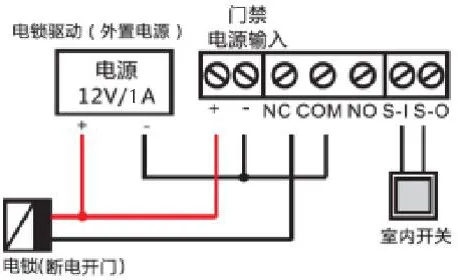
Схема подключения в режиме внешнего питанияСхема подключения в режиме внешнего питания

Каталог
обслуживание клиентов Телефон
We use cookie to improve your online experience. By continuing to browse this website, you agree to our use of cookie.

Cookies

This Cookie Policy explains how we use cookies and similar technologies when you access or use our website and related services. Please read this Policy together with our Terms and Conditions and Privacy Policy so that you understand how we collect, use, and protect information.

By continuing to access or use our Services, you acknowledge that cookies and similar technologies may be used as described in this Policy, subject to applicable law and your available choices.

Updates to This Cookie Policy

We may revise this Cookie Policy from time to time to reflect changes in legal requirements, technology, or our business practices. When we make updates, the revised version will be posted on this page and will become effective from the date of publication unless otherwise required by law.

Where required, we will provide additional notice or request your consent before applying material changes that affect your rights or choices.

What Are Cookies?

Cookies are small text files placed on your device when you visit a website or interact with certain online content. They help websites recognize your browser or device, remember your preferences, support essential functionality, and improve the overall user experience.

In this Cookie Policy, the term “cookies” also includes similar technologies such as pixels, tags, web beacons, and other tracking tools that perform comparable functions.

Why We Use Cookies

We use cookies to help our website function properly, remember user preferences, enhance website performance, understand how visitors interact with our pages, and support security, analytics, and marketing activities where permitted by law.

We use cookies to keep our website functional, secure, efficient, and more relevant to your browsing experience.

Categories of Cookies We Use

Strictly Necessary Cookies

These cookies are essential for the operation of the website and cannot be disabled in our systems where they are required to provide the service you request. They are typically set in response to actions such as setting privacy preferences, signing in, or submitting forms.

Without these cookies, certain parts of the website may not function correctly.

Functional Cookies

Functional cookies enable enhanced features and personalization, such as remembering your preferences, language settings, or previously selected options. These cookies may be set by us or by third-party providers whose services are integrated into our website.

If you disable these cookies, some services or features may not work as intended.

Performance and Analytics Cookies

These cookies help us understand how visitors use our website by collecting information such as traffic sources, page visits, navigation behavior, and general interaction patterns. In many cases, this information is aggregated and does not directly identify individual users.

We use this information to improve website performance, usability, and content relevance.

Targeting and Advertising Cookies

These cookies may be placed by our advertising or marketing partners to help deliver more relevant ads and measure the effectiveness of campaigns. They may use information about your browsing activity across different websites and services to build a profile of your interests.

These cookies generally do not store directly identifying personal information, but they may identify your browser or device.

First-Party and Third-Party Cookies

Some cookies are set directly by our website and are referred to as first-party cookies. Other cookies are set by third-party services, such as analytics providers, embedded content providers, or advertising partners, and are referred to as third-party cookies.

Third-party providers may use their own cookies in accordance with their own privacy and cookie policies.

Information Collected Through Cookies

Depending on the type of cookie used, the information collected may include browser type, device type, IP address, referring website, pages viewed, time spent on pages, clickstream behavior, and general usage patterns.

This information helps us maintain the website, improve performance, enhance security, and provide a better user experience.

Your Cookie Choices

You can control or disable cookies through your browser settings and, where available, through our cookie consent or preference management tools. Depending on your location, you may also have the right to accept or reject certain categories of cookies, especially those used for analytics, personalization, or advertising purposes.

Please note that blocking or deleting certain cookies may affect the availability, functionality, or performance of some parts of the website.

Restricting cookies may limit certain features and reduce the quality of your experience on the website.

Cookies in Mobile Applications

Where our mobile applications use cookie-like technologies, they are generally limited to those required for core functionality, security, and service delivery. Disabling these essential technologies may affect the normal operation of the application.

We do not use essential mobile application cookies to store unnecessary personal information.

How to Manage Cookies

Most web browsers allow you to manage cookies through browser settings. You can usually choose to block, delete, or receive alerts before cookies are stored. Because browser controls vary, please refer to your browser provider’s support documentation for details on how to manage cookie settings.

Contact Us

If you have any questions about this Cookie Policy or our use of cookies and similar technologies, please contact us at support@becke.cc .